
Time is the only currency you can spend but never earn back.
A few years ago, I had a terrifying realization while sitting on my balcony one Friday evening. I was utterly exhausted. My brain felt like a wrung-out sponge, and I had been “working” for nearly fifty hours that week. Yet, when I looked back at what I had actually accomplished, my list of completed projects was embarrassingly short.
I was stuck in the ultimate modern trap: I was confusing motion with progress.
My days were a blur of answering emails, sitting in endless video meetings, responding to slack messages, and putting out tiny fires. I was incredibly busy, but I wasn’t actually moving the needle on anything important. I was letting everyone else’s emergencies dictate my schedule, leaving my own goals to collect dust.
I realized that “time management” is actually a misnomer. You cannot manage time. Time moves forward at the exact same speed regardless of what you do. What you are actually managing is your attention.
I needed to radically overhaul how I directed my attention throughout the day. Willpower wasn’t enough; I needed structural guardrails. I spent months auditing my days and testing software until I built a bulletproof digital workflow.
If you constantly feel like there are never enough hours in the day, here are the 8 time management apps that rescued my schedule and completely transformed my output.
1. Toggl Track: The Brutal Truth Teller
You cannot fix a leak if you don’t know where the water is going.
When I first decided to take back my schedule, I thought I had a pretty good idea of how I spent my days. I assumed I spent about four hours on deep, creative work, two hours on admin tasks, and maybe an hour on email.
To prove this, I downloaded Toggl Track. It is a deceptively simple app. You just type in what you are doing and hit a “Start” button. When you finish the task, you hit “Stop.”
After one week of meticulously tracking every single thing I did, the data completely shattered my ego. I wasn’t doing four hours of deep work. I was doing roughly ninety minutes. The rest of my day was vanishing into the void of social media, formatting spreadsheets, and endlessly refreshing my inbox.
I eventually documented this entire philosophical shift in my article about (Apps That Help Me Track Time and Work Smarter), but the very first step was admitting the truth.
Toggl forced me to be honest with myself. Once I could see the hard, undeniable data in a pie chart, I could finally start making surgical adjustments to my routine. I still use it every single day because the sheer act of clicking “Start” on a timer forces my brain to commit to the task at hand.

2. Todoist: The Cognitive Relief Valve
Your brain is a spectacular tool for generating ideas, but it is an absolutely terrible place to store them.
In my chaotic years, I used to try to remember everything I needed to do. I would lay in bed at night, staring at the ceiling, mentally repeating, “Don’t forget to email the accountant tomorrow. Don’t forget to buy coffee beans.” It caused a constant, low-grade hum of anxiety in the background of my life.
I needed a frictionless way to get thoughts out of my head and into a trusted system. Todoist became my cognitive relief valve.
The magic of Todoist is its natural language processing. If I am in the middle of writing an important report and I suddenly remember I need to call my mother, I don’t break my focus. I hit a keyboard shortcut, a tiny box appears on my screen, and I type: “Call Mom tomorrow at 6pm.”
I hit enter. The box disappears. Todoist automatically understands the date and time, schedules the reminder, and gets it out of my way. I can instantly return to my deep work, knowing with absolute certainty that the app will remind me when the time comes.
3. Google Calendar: The Unforgiving Architect
A to-do list tells you what you need to accomplish. A calendar tells you when it is actually going to happen.
For a long time, my calendar was exclusively reserved for meetings and dentist appointments. My actual work lived on a completely separate, infinitely long list. The problem is that a list has no concept of physical time. You can put thirty items on a to-do list, but you cannot bend the laws of physics to complete them all in an eight-hour workday.
I adopted a practice called “time blocking.” I’ve gone deep into this method before when discussing (Productivity Hacks Using Calendar and Reminder Apps), and it is the single most effective scheduling technique I have ever learned.
Now, every Sunday night, I look at my to-do list and I drag every single task onto my Google Calendar as a physical block of time. If a task takes two hours, it takes up a two-hour visual chunk of my day.
This does two things. First, it forces me to be realistic about my capacity. When my calendar is full, it is full. I cannot say “yes” to a new project because I can physically see that there is no white space left. Second, it eliminates decision fatigue. When I wake up on Tuesday morning, I don’t have to wonder what to do first. My calendar is my boss, and it tells me exactly what to execute at 9:00 AM.
4. Forest: The Gamified Focus Shield
Even with a perfect plan and a blocked calendar, the modern internet is a minefield of distractions. It is incredibly hard to stare at a blank document when the entire world is just one browser tab away.
I needed a way to artificially manufacture discipline. Enter the Forest app.
Forest is essentially a Pomodoro timer, but wrapped in a brilliant layer of psychological gamification. When you need to focus on a task, you open the app and plant a virtual seed. You set a timer—say, for 45 minutes.
As the timer ticks down, your seed slowly grows into a digital tree. But here is the catch: if you leave the app to check Instagram, read a text message, or scroll through the news, your virtual tree immediately withers and dies.
It sounds incredibly silly, but the human brain hates breaking a streak and destroying something it has nurtured. Countless times, my thumb has instinctively swiped toward my social media folder, only to stop because I didn’t want to kill the little digital pine tree growing on my screen. It is a gentle, surprisingly effective way to train your attention span.
5. Freedom: The Digital Bouncer
There are days when the gentle gamification of a virtual tree simply isn’t enough. There are days when I am tired, my willpower is absolutely depleted, and my brain is screaming for the cheap dopamine of a scrolling feed.
On those days, I bring in the heavy artillery.
Freedom is a heavy-duty app and website blocker that operates across all your devices simultaneously. It doesn’t ask politely; it completely severs your access.
I have a daily schedule set up in the app. Every morning from 8:00 AM to 11:00 AM, Freedom automatically engages. During those three hours, it completely blocks my access to Twitter, Reddit, news websites, and even my own email inbox.
If I try to navigate to a distracting site, I am met with a harsh green screen telling me I am blocked. I cannot bypass it. I cannot turn it off. I am forced to sit with my boredom and actually do my work. Taking the choice out of the equation is often the most profound time management strategy of all.

6. Pocket: The Distraction Vault
How many times has this happened to you? You are in the middle of researching a project, and you stumble across an incredibly fascinating, 3,000-word article about the history of the Roman Empire, or a new technological breakthrough.
You tell yourself, “I’ll just read this quickly.” Forty minutes later, your workflow is completely shattered.
The internet is a machine designed to pull you down rabbit holes. To fight this, I started using Pocket.
Pocket is a read-it-later app that acts as a digital vault for distractions. I have an extension installed on my browser and on my phone. Now, whenever I find an amazing article or a long-form video during my work hours, I don’t consume it. I just click the Pocket button.
The app instantly strips the article of its ads, downloads the text, and saves it for offline reading. I get the dopamine hit of “saving” the information without actually losing any of my current work time.
Then, on Sunday mornings, when I am drinking my coffee and actually have free time, I open Pocket and read through all the fascinating things I saved during the week. It separates the discovery of content from the consumption of content.
7. Notion: The Context Manager
Time isn’t just lost to distractions; it is heavily lost to “context switching.”
Think about how much time you waste simply looking for things. You open your email to find a brief, then you open Google Drive to find the spreadsheet, then you open Slack to find the message thread where your boss approved the budget. Moving between these different environments is exhausting.
Notion completely solved this for me. It acts as the ultimate central command center for my digital life.
When I start a new project, I build a single page in Notion. I embed the spreadsheets directly into that page. I paste the meeting notes there. I drag the PDF briefs into the exact same space.
When my Google Calendar tells me it is time to work on Project X, I open my Notion workspace, and every single piece of information I could possibly need is sitting right there on one screen. I never have to hunt for a file again. It keeps me in a state of flow for hours.
8. Zapier: The Invisible Assistant
The final frontier of time management is realizing that you shouldn’t be doing everything yourself. A massive amount of our daily digital work is just robotic copy-and-pasting.
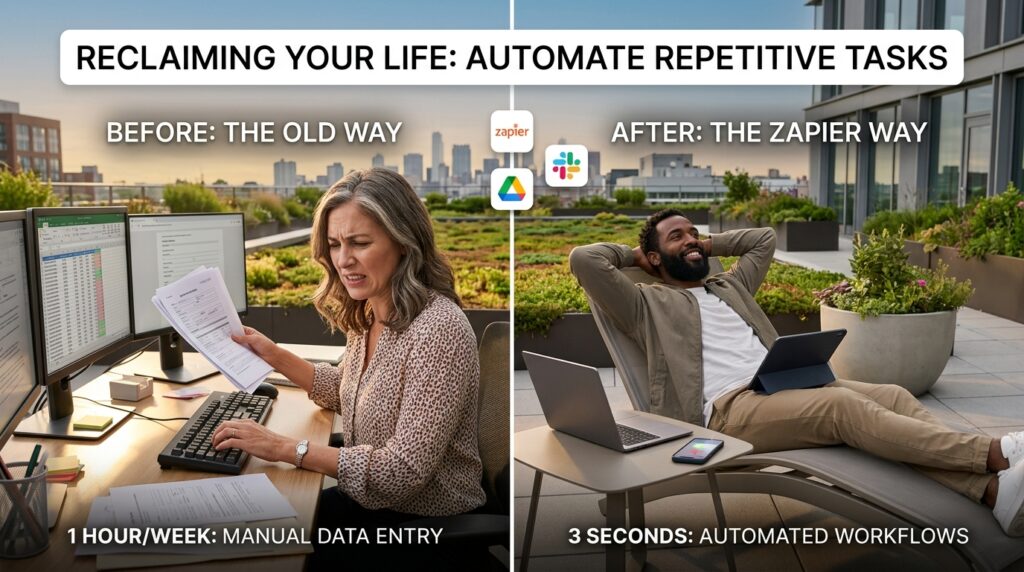
I used to spend an hour every week taking new client inquiries from a web form and manually typing their names and emails into my contact database, and then manually creating a folder for them in Google Drive.
I started using Zapier to eliminate this. This is a principle I outlined extensively in (How to Automate Repetitive Tasks on Your Phone), where I explained how automation buys back your life.
Zapier connects different apps together. Now, when a client fills out that form, the software automatically catches the data, creates the contact in my database, generates the new Google Drive folder, and sends me a Slack message with the link. What used to take me an hour of mind-numbing administrative clicking now happens in the background in less than three seconds.
Final Thoughts on Reclaiming Your Life
If you read through this list and feel a sense of overwhelm, please take a deep breath.
You do not need to download eight new applications today. In fact, doing so would probably ruin your productivity for the next week as you try to learn how to use all of them at once.
Time management is a slow, iterative process of building better systems. I didn’t adopt all of these tools on a single Tuesday. I layered them into my life over the course of three years, addressing my biggest bottlenecks one by one.
If you are struggling right now, just pick one area to fix. If you don’t know where your time is going, start with a tracker like Toggl. If you can’t remember your tasks, start with Todoist. If you are hopelessly distracted, install Freedom.
The goal isn’t to turn yourself into a hyper-efficient robot who works every second of the day. The goal is the exact opposite. The goal of time management is to do your work with such precision and focus that you can actually close your laptop at 5:00 PM, walk away without guilt, and enjoy the rest of your beautiful, unoptimized life.
