
A few years ago, I was standing on a crowded wooden schooner in Ilha Grande, a breathtaking island off the coast of Rio de Janeiro. The sun was setting, painting the sky in vibrant shades of magenta and gold, and the water was crystal clear. It was a perfect moment. I leaned over the edge of the boat, holding my smartphone out over the ocean to get the perfect wide-angle shot of the horizon.
Suddenly, the boat hit an unexpected wave. Another passenger stumbled, bumping hard into my shoulder.
My phone slipped from my grip. I stood frozen in absolute horror as I watched my expensive device sink like a stone into the dark blue water, disappearing forever.
The immediate sting of losing an expensive piece of hardware was painful, but that wasn’t why my stomach dropped. I realized, with a sickening wave of panic, that I hadn’t backed up my phone in over two years.
Lying at the bottom of the Atlantic Ocean were roughly 14,000 photographs. I had lost the pictures from my sister’s wedding, photos of a beloved pet who had passed away, and three years of irreplaceable daily memories. They were gone. No amount of money could buy them back.
We treat our smartphones like modern-day, digital scrapbooks, but we forget that they are incredibly fragile glass rectangles that can be stolen, broken, or dropped in the ocean in a split second. Relying on local device storage is not a strategy; it is a ticking time bomb.
That terrible day fundamentally changed how I handle my digital life. Securing my data became my absolute top priority. This incident actually kicked off a massive overhaul of my entire technological ecosystem, a journey I heavily detailed when writing about (10 Apps That Helped Me Declutter My Digital Space). You simply cannot organize a digital life if you are constantly terrified of losing its most precious files.
Since then, I have ruthlessly tested cloud storage platforms, backup drives, and photo management software. I refuse to ever feel that sinking feeling again. If you are currently walking around with thousands of unbacked-up photos in your pocket, please, let my mistake be your warning. Here are the 12 photo storage apps that will keep your memories permanently safe.
1. Google Photos: The Intelligent Archiver
If there is one app on this list that feels like actual magic, it is Google Photos. This is the absolute gold standard for the average smartphone user, and it is the first app I install on any new device.
The most powerful feature of Google Photos isn’t just the cloud storage; it is the artificial intelligence search engine. The app automatically scans and tags the contents of your images without you having to lift a finger. If I am trying to find a picture of a specific dinner party from three years ago, I don’t have to scroll through thousands of thumbnails. I just type “Pizza” or “Red wine” into the search bar, and the app instantly pulls up every photo I’ve ever taken containing those items.
It completely removes the burden of manually organizing files into folders. You just let the app back everything up in the background over Wi-Fi, and trust the search bar to find what you need.

2. Apple iCloud Photos: The Frictionless Ecosystem
If you are fully immersed in the Apple ecosystem—meaning you own an iPhone, a Mac, and an iPad—iCloud Photos offers a level of frictionless integration that is impossible to beat.
The beauty of iCloud is that it is baked directly into the operating system of your devices. You don’t have to remember to open a third-party app to initiate a backup. The moment you take a photo on your iPhone, it is securely uploaded to iCloud and instantly appears in the Photos app on your Mac and iPad.
Furthermore, it boasts an incredible “Optimize Storage” feature. It keeps the high-resolution, original files safely in the cloud, while keeping much smaller, compressed preview versions on your physical phone. This ensures you can scroll through your entire ten-year photo history without maxing out your iPhone’s physical storage capacity.
3. Amazon Photos: The Prime Member’s Hidden Gem
Millions of people pay for Amazon Prime just for the free two-day shipping and the streaming video service, completely unaware that they are ignoring one of the greatest perks of the membership.
If you have an Amazon Prime account, you automatically get unlimited, full-resolution photo storage through the Amazon Photos app.
Let me repeat that: unlimited full-resolution storage. Most cloud providers compress your photos slightly to save server space, or force you to upgrade to a massive, expensive paid tier once you hit 100 gigabytes. Amazon Photos lets you upload massive RAW files straight from a professional camera without downgrading the quality, and it won’t cost you an extra dime on top of your existing Prime membership.
4. Dropbox: The Traditionalist’s Vault
Not everyone likes the AI-driven, automatic sorting of Google or Apple. Some people are traditionalists. They want to create their own specific folders, name their own files, and maintain absolute, granular control over their digital archives.
For those people, Dropbox remains the ultimate utility.
Dropbox treats your photos just like any other file. It doesn’t try to automatically create slideshows or apply wacky filters. It just provides a rock-solid, incredibly fast synchronization engine. I use Dropbox specifically for my professional photography backups. I can create a folder labeled “2024 Client Shoot – Wedding,” drop the high-resolution files inside, and securely share a link with the client in seconds. It is the digital equivalent of a heavy-duty filing cabinet.
5. OneDrive: The PC Powerhouse
For users who operate primarily on Windows PCs but use Android or iOS smartphones, Microsoft OneDrive is the perfect bridge between those worlds.
The OneDrive mobile app has a fantastic automated camera roll backup feature that works quietly in the background. But where it truly shines is how it interacts with your desktop computer. The photos automatically sync to the native file explorer on your Windows machine.
This makes managing large batches of photos incredibly easy. You can drag, drop, rename, and organize thousands of pictures using your mouse and keyboard, and those changes will instantly reflect on your mobile app. It is seamless, reliable, and deeply integrated with the Microsoft Office suite.
6. Flickr: The Community Portfolio
Flickr is one of the oldest photo-sharing platforms on the internet, but it has aged beautifully. While it functions perfectly well as a private storage vault, its true value lies in its community aspect.
Once I finished using (The Photography App That Took My Pictures From Good to Amazing), I wanted a place to actually show off my high-resolution edits, not just store them in a dark digital closet.
Flickr allows you to store your photos at full resolution while preserving all the EXIF data (the metadata that shows what camera, lens, and settings you used). You can keep your family albums strictly private, while making your artistic landscape shots public. It connects you with thousands of other photography enthusiasts, allowing you to share your work in a space designed specifically to appreciate high-quality imagery, rather than the compressed, fast-paced feed of Instagram.

7. SmugMug: The Professional’s Gallery
If photography is more than just a casual hobby for you—if you are a professional, or an advanced amateur who takes pride in displaying your work—SmugMug is in a league of its own.
SmugMug is not just a storage app; it is a premium gallery builder. It offers completely unlimited, full-resolution storage, but it also allows you to build a stunning, personalized website to display those photos.
The privacy and security controls are industry-leading. You can password-protect specific galleries, hide them from search engines, and even set up customized watermarks to protect your intellectual property. If you ever want to sell prints of your photos, SmugMug handles the e-commerce and printing fulfillment for you. It is a serious tool for serious creators.
8. pCloud: The Lifetime Investment
One of the most frustrating aspects of modern digital life is “subscription fatigue.” We pay monthly fees for our music, our movies, our software, and our storage. Month after month, year after year, the cost of cloud storage adds up significantly.
pCloud completely disrupted this industry by offering a “Lifetime Plan.”
You pay a single, one-time fee, and you get access to your cloud storage forever. No more monthly credit card charges. Beyond the brilliant pricing model, pCloud is based in Switzerland, a country renowned for its incredibly strict digital privacy laws. It offers high-speed syncing, a great mobile app for automatic camera roll backups, and the profound peace of mind that comes from knowing your storage bill is paid for life.
9. MEGA: The Privacy Fortress
In an era where tech giants scan our photos to train their algorithms or serve us targeted advertisements, digital privacy has become a massive concern. If you are uploading photos of your children, your personal documents, or your private life to the cloud, you want to know that nobody else can see them.
MEGA was built with an uncompromising focus on security.
It utilizes “zero-knowledge,” end-to-end encryption. This means that your photos are encrypted on your physical device before they are sent to MEGA’s servers. MEGA does not hold the decryption key. Even if their servers were completely compromised by hackers, or if a government demanded your files, the data would just look like an unreadable string of random code. You are the only person on Earth holding the key to your memories.
10. Box: Enterprise Security for the Home
Box is traditionally known as a heavy-duty, enterprise-level file management system used by massive corporations. However, using their personal tier for your photo storage brings Fortune 500-level security to your family albums.
Box excels in collaboration. If you just went on a massive family vacation with extended relatives, creating a shared Box folder is the easiest way to aggregate everyone’s memories. You can set granular permissions, allowing your parents to upload their photos to the folder, while only giving your siblings “view-only” access. It handles massive file sizes with ease and provides a sterile, highly professional environment free from the clutter of consumer-focused apps.
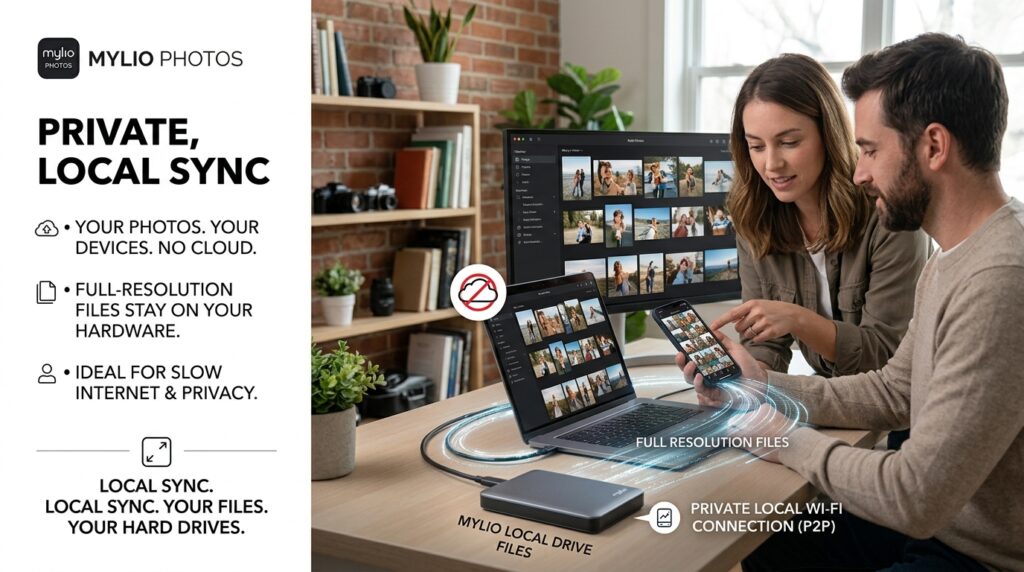
11. Mylio Photos: The Offline Sync Engine
Mylio Photos is a completely unique beast in the storage world because it challenges the idea that your photos must live on someone else’s server.
If you spend hours learning (How to Edit Photos Like a Pro on Your Phone), the last thing you want is a cloud service quietly compressing your massive raw files to save their own server space.
Mylio operates on a peer-to-peer network. It connects your phone, your laptop, and your external hard drives directly to each other over your local Wi-Fi. It creates a unified library across all your devices without actually uploading your full-resolution files to the public cloud. It is perfect for people who live in areas with slow internet connections, or for hardcore privacy advocates who want cloud-like convenience but insist on keeping their files on their own physical hard drives.
12. Shutterfly: The Print-Centric Backup
In our obsession with digital storage, we have largely forgotten the profound joy of holding a physical photograph in our hands.
Shutterfly bridges the gap between the digital and physical worlds. The Shutterfly app offers unlimited free photo storage from your smartphone, with one very specific catch: you have to be an active customer who occasionally buys physical products from them.
I use the Shutterfly app to automatically back up my favorite moments, and then once every few months, I use those exact files to order physical photo books, canvas prints, or holiday cards. It encourages a mindset shift. It reminds you that photos aren’t just meant to sit on a server in a desert somewhere; they are meant to be printed, framed, and put on your living room wall.
Final Thoughts on Preserving Your History
When you think about the most valuable things you own, your mind might initially jump to your car, your house, or your jewelry. But if a fire were to break out in your home, and all the humans and pets were safely outside, what is the one thing you would run back inside to grab?
For almost everyone, the answer is the photo albums.
Photographs are the only tangible proof we have of the beautiful, fleeting moments of our lives. They are the faces of the people we loved who are no longer here. They are the places we traveled to when we were young. They are the visual anchor to our own history.
Do not trust your history to a fragile piece of glass that can slip out of your hands on a boat.
The digital world is perilous, but the solutions are incredibly cheap, automated, and easy to set up. Pick an ecosystem that makes sense to you—whether it is the AI magic of Google, the lifetime investment of pCloud, or the extreme privacy of MEGA. Download the app tonight, turn on “Automatic Backup,” and let the software do the heavy lifting. Give yourself the profound luxury of knowing that no matter what happens to your phone tomorrow, your memories are permanently, unquestionably safe.
