
I used to believe that travel planning was a necessary evil, a painful rite of passage you had to endure before you were allowed to enjoy a vacation.
A few years ago, planning a simple ten-day trip to Italy required the administrative stamina of a corporate project manager. I remember sitting at my kitchen table, surrounded by a chaotic mess of physical guidebooks, printed booking confirmations, and a heavily color-coded Excel spreadsheet that was slowly driving me insane. I had forty-two browser tabs open simultaneously. I was trying to cross-reference train schedules on an Italian website I couldn’t read with the check-in times of an Airbnb host who only responded every three days.
By the time I finally boarded the plane, I was already exhausted. The “vacation” felt like a logistical puzzle that I was terrified of failing.
The turning point came when I lost my physical folder of printed tickets somewhere between a gelateria and the Colosseum in Rome. The sheer panic of that moment forced me to rethink my entire system. We live in an era where we carry supercomputers in our pockets. There was absolutely no reason to be relying on paper folders and manual data entry to navigate the world.
I decided to completely digitize my travel logistics. I spent the next few years tearing down my old habits and building a streamlined, stress-free system entirely contained within my smartphone.
If the thought of booking a multi-city vacation makes your chest tight with anxiety, you are going about it the hard way. You do not need to be a hyper-organized Type-A personality to plan a flawless adventure. You just need to let software do the heavy lifting.
Here is my exact, step-by-step blueprint on how to plan a trip from start to finish using only mobile apps.
Phase 1: The Incubation and Flight Hunting
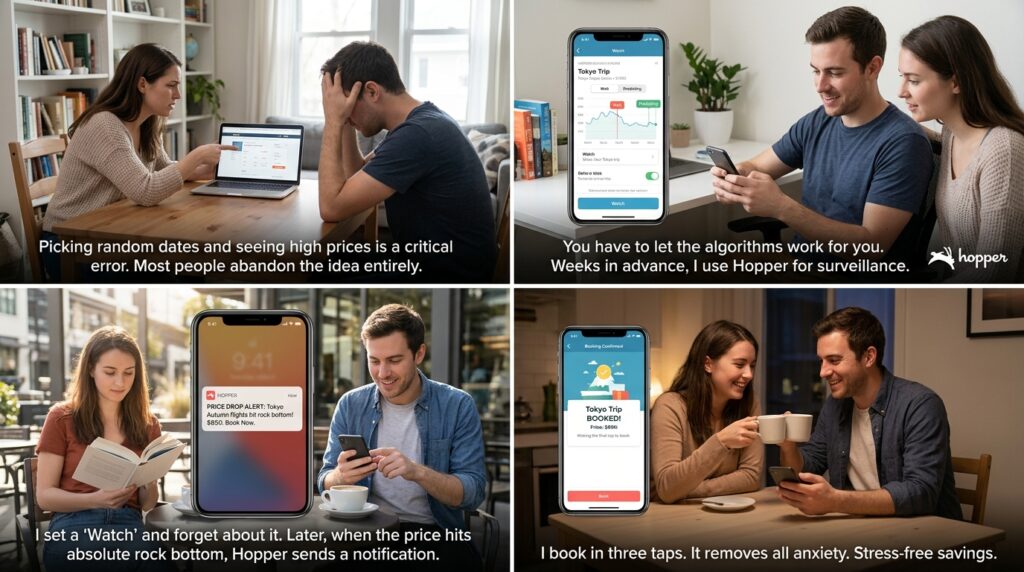
Every trip starts with a destination and a budget, and this is where most people make their first critical error. They pick arbitrary dates, search for flights once, see an astronomical price, and abandon the idea entirely.
You have to let the algorithms work for you. I start my planning phase months in advance using an app called Hopper.
Hopper is a flight booking app with an incredibly powerful predictive AI. I don’t use it to buy flights immediately; I use it for surveillance. If I know I want to go to Tokyo in the fall, I plug those parameters into Hopper.
The app analyzes billions of historical flight prices and gives me a definitive command: “Wait” or “Buy Now.” It will literally tell me that it predicts the price will drop by $150 in the next three weeks. I set a “Watch” on the trip, close the app, and completely forget about it.
I let the app monitor the global aviation market in the background. Weeks later, when the price hits absolute rock bottom, Hopper sends me a push notification, and I book the flight in three taps. It removes all the emotional anxiety of wondering if I got a good deal.
Phase 2: Building the Digital Skeleton
The moment I book that flight, my inbox receives a confirmation email. In the old days, I would have printed this out. Now, I use the foundational tool of my entire travel system: TripIt.
TripIt is a master itinerary builder, and it is arguably the most essential tool I use. I actually mentioned this app prominently when I compiled a list of (11 Travel Planning Apps That Save Hours of Work), because its core functionality is practically magic.
Whenever I receive an email confirmation for a flight, a hotel, a rental car, or a museum tour, I simply forward that email to a specific TripIt email address. I don’t type a single thing.
The app’s software automatically scans the email, extracts the booking reference numbers, flight times, and terminal gates, and constructs a beautiful, chronological master timeline of my trip. It is the central digital skeleton of my vacation. Best of all, the app downloads this itinerary for offline use, meaning when I land in a foreign country without cellular data, I can still pull up my hotel’s exact address for the taxi driver.
Phase 3: Securing the Basecamp
Once the flights are locked into TripIt, I need a place to sleep. My go-to app for this phase is Airbnb, but the way I use it has evolved significantly.
I no longer just look at pretty pictures of living rooms. I use the map feature extensively. When planning a trip, the location of your accommodation is far more important than the thread count of the sheets.
Before I book anything on Airbnb, I open Google Maps side-by-side with it. I find the exact neighborhood the Airbnb is in, and I search for “transit stops,” “grocery stores,” and “coffee shops” nearby. A beautifully cheap apartment is not a good deal if it requires a thirty-minute uphill walk to the nearest train station every morning.
Google Maps allows me to calculate the exact walking distance from the potential rental to the main sights I want to see. This dual-app approach ensures I never end up stranded in an inconvenient, isolated part of the city.
Phase 4: Mapping the Day-to-Day Logistics
This is the part of the process that used to break me: figuring out how to actually get around once I arrived. Understanding a foreign public transit system can be deeply intimidating.
My secret weapon for this is Rome2Rio.
If you are planning a trip that involves moving between different cities or towns—say, traveling from Paris to a small coastal village in Normandy—Rome2Rio is indispensable. You plug in your starting point and your destination, and the app searches every train, bus, ferry, and flight path on the planet.
It will give you highly specific instructions: “Walk 10 minutes to Gare du Nord, take the regional train for 2 hours, then catch the 14B bus.” It even provides estimated costs and links to buy the tickets.
Once I am actually inside a city, I switch to Citymapper. While Google Maps is great for driving, Citymapper is the undisputed king of urban public transit. It tells you exactly which subway car to board so you are closest to the exit when you arrive, and it alerts you when your stop is coming up so you don’t miss it while staring out the window.
Phase 5: The Fun Stuff (Curating Experiences)
Now that the flights, hotels, and transit are handled, the actual fun begins: figuring out what to eat and what to do.
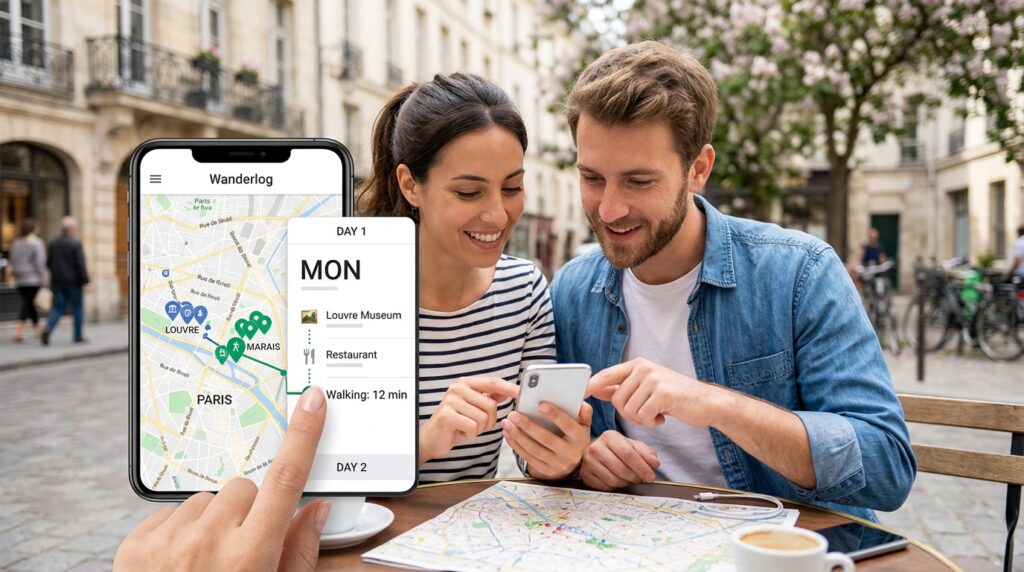
For curating the daily experience, I rely heavily on an app called Wanderlog.
Wanderlog is a visual planner designed specifically for road trips and city explorations. Whenever a friend recommends a great hidden tapas bar, or I see a beautiful viewpoint on Instagram, I drop the name into Wanderlog.
The app immediately pulls up the location, opening hours, and photos, and pins it to an interactive map. Once I have a dozen places saved, Wanderlog does something incredible: it helps me group them geographically.
It will show me that three of the restaurants and two of the museums I want to visit are all clustered in the same neighborhood. I then drag and drop those specific items into a “Day 1” folder. The app automatically calculates the walking time between each stop, creating a perfectly optimized, logical route. No more zigzagging across a massive city and wasting hours on the subway.
Phase 6: Eliminating Financial Stress
Traveling involves spending money, and keeping track of different currencies and group expenses can quickly ruin the vibe of a vacation.
I’ve spent a lot of time testing different financial systems for travel, a topic I covered deeply in my guide on (How I Optimized My Travel Apps to Save Time and Money). The key is to remove the math from the equation entirely.
If I am traveling with friends or a partner, the first thing we do before leaving for the airport is download Splitwise.
Splitwise is the ultimate group trip peacemaker. Whenever anyone pays for anything—a round of beers, a taxi fare, a museum ticket—they simply enter the amount into the app and select who was involved. The app keeps a running, objective tally in the background in the local currency.
At the end of the trip, you press a button, and Splitwise calculates the simplest possible way for everyone to settle their debts. It completely eliminates the awkward “who owes who” conversations over dinner.
For my personal budget, I use TravelSpend. It allows me to set a daily allowance for the trip. Every time I buy a coffee, I type the price into the app in Euros or Yen, and it instantly converts it to my home currency and deducts it from my daily budget. It keeps me financially grounded without making me feel like an accountant.
Phase 7: Automating the Pre-Trip Chores
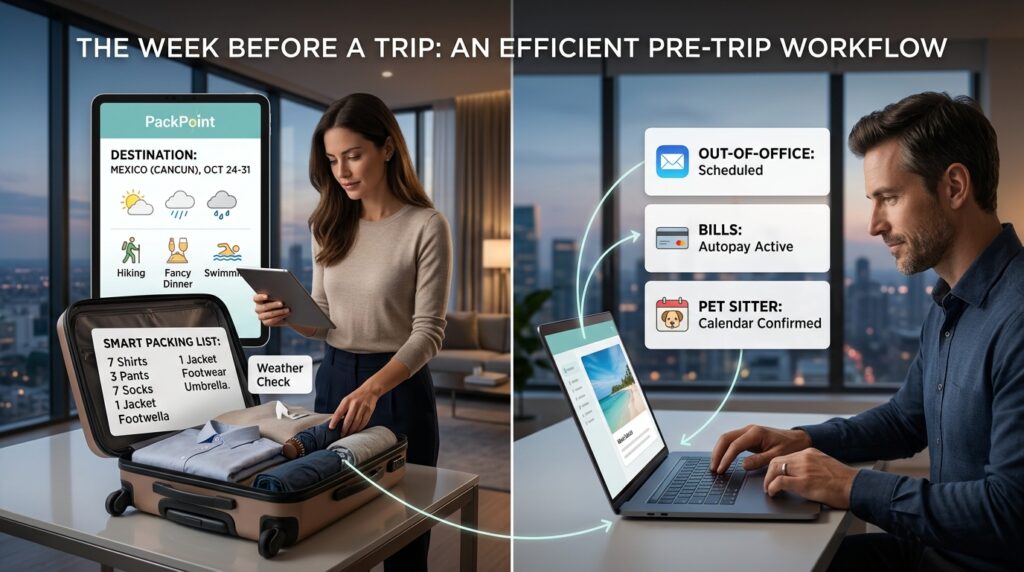
The week before a trip is usually a frenzy of packing anxiety and last-minute errands.
To prevent myself from forgetting my toothbrush or my adapters, I use an app called PackPoint. This app removes the cognitive load of deciding what to bring. You type in your destination, the length of your stay, and your planned activities (hiking, fancy dinners, swimming).
PackPoint then checks the actual weather forecast for your destination during your specific dates and automatically generates a highly detailed packing list. It tells me exactly how many pairs of socks to bring and whether I need an umbrella.
Beyond packing, I use the final days before the trip to automate my life at home. I don’t want to be worrying about paying my internet bill while I am sitting on a beach in Mexico. Setting up digital safeguards is a massive part of my workflow, which I detailed in my article about (How I Automated My Daily Tasks With Mobile Apps). I ensure all my bills are set to autopay, my out-of-office email responder is scheduled, and my pet sitter has digital calendar invites for the dates I am gone.
Phase 8: The Arrival Protocol
The final piece of the app puzzle happens the moment the airplane wheels touch down on the runway.
In the past, arriving in a foreign country meant navigating a chaotic airport to find an overpriced SIM card kiosk just so you could get cellular data to order an Uber.
I now use Airalo, an eSIM marketplace app. A few days before my trip, I use the app to purchase a digital data plan for my destination country. While the plane is taxiing to the gate, I go into my phone settings, toggle the digital eSIM on, and I instantly have 5G internet access. I am ordering a ride-share and texting my family that I arrived safely before I have even unbuckled my seatbelt.
Finally, I make sure the Google Translate app is loaded with the local language downloaded for offline use, and I have the offline map of the city downloaded in Google Maps.
Final Thoughts on Digital Freedom
When you look at this entire process written out, it might seem like a lot of different software to manage. But the reality is that these apps are designed to be entirely frictionless. They communicate with each other, they operate in the background, and they require very little manual input from you.
Planning a trip should not feel like a second job. It should be the exciting prologue to your adventure.
By trusting these applications to handle the predictive pricing, the itinerary organization, the geographic mapping, and the financial tracking, you are buying back hours of your own time. You are eliminating the blind spots that cause travel anxiety.
The next time you decide you want to see the world, do not reach for a spreadsheet or a physical folder. Let the algorithms track the flights, let the AI build your itinerary, and let your smartphone act as the ultimate, personalized travel agent. All you have to do is pack your bags, show up at the airport, and enjoy the ride.
