
I was sitting in a quiet corner of my favorite local coffee shop, holding a physical, paper book that I had been promising myself I would read for over a month. The ambient noise was perfect. My espresso was hot. I was entirely ready to disconnect from the digital world and enjoy an hour of uninterrupted reading.
I opened the book to chapter one and read the first paragraph.
Then, my smartphone, resting face-up on the table, lit up. It was a completely meaningless notification—a promotional email from a shoe company telling me about a weekend sale. But the screen illuminating caught the corner of my eye.
I picked up the phone. I reasoned with myself that I would just swipe the notification away to clear the screen, and then immediately return to my book.
I swiped the email away. But while the screen was unlocked, my thumb unconsciously drifted over to the Instagram icon. I tapped it. I started scrolling. Thirty seconds later, I opened X (formerly Twitter) to see why a certain celebrity was trending. Then, I opened a web browser to look up the cast of a movie I had watched three nights ago.
When I finally snapped out of my digital trance, my coffee was ice cold. Forty-five minutes had vanished into thin air. I looked down at the physical book in my lap, still open to page one.
I felt a profound sense of self-disgust. I was a grown adult with career ambitions and personal goals, yet I was completely at the mercy of a glowing glass rectangle.
For a long time, the common advice for this problem was simply to “put the phone away.” We are told to rely on willpower, to leave our devices in another room, or to switch to a vintage flip phone. But in today’s modern economy, those solutions are largely fantasies. I need my smartphone to authenticate my work logins, communicate with my family, and navigate my city.
I couldn’t just throw the device away. Instead, I had to turn the weapon back on itself.
I decided to stop fighting my phone with raw willpower and started programming it to protect my attention. I downloaded specific, aggressive software designed to short-circuit my bad habits. If you feel like your attention span has been completely fractured by your device, here is exactly how I use mobile apps to radically reduce distractions and reclaim my time.
1. Facing the Ugly Truth: Screen Time Aggregators
You cannot defeat an enemy that you refuse to look at.
Before I could start blocking distractions, I needed to know exactly how bad my problem was. Most of us operate under a massive delusion regarding our screen time. If you ask the average person how much time they spend on social media, they will usually guess around an hour.
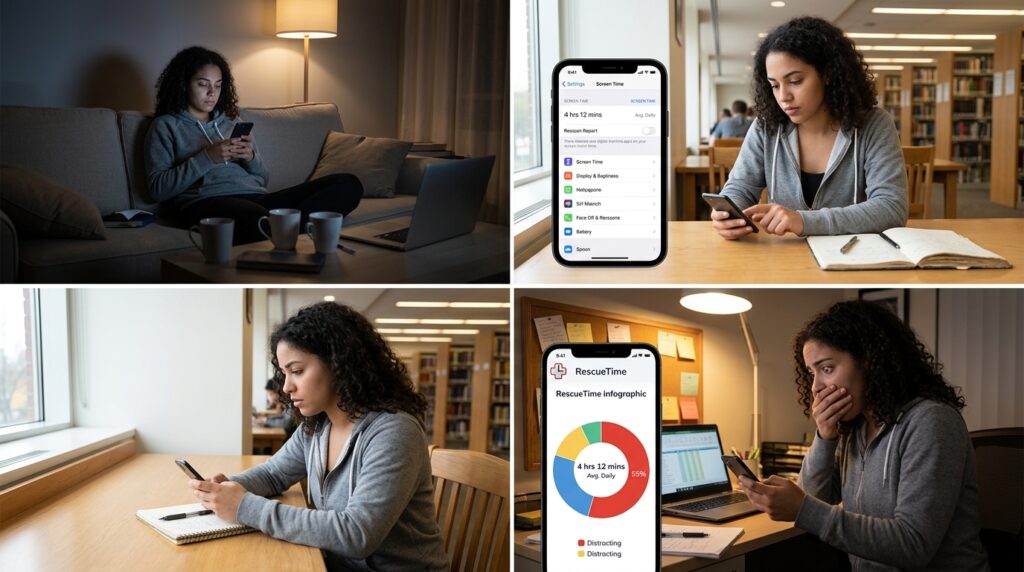
To get the real data, I started heavily utilizing my phone’s native digital wellbeing trackers (Screen Time on iOS, or Digital Wellbeing on Android), but I paired them with an app called RescueTime.
RescueTime runs quietly in the background and categorizes every single minute of your digital life. At the end of my first week using it, the app sent me a report that felt like a punch to the gut. I was spending an average of four hours and twelve minutes a day staring at my screen. Over two hours of that was categorized as “Highly Distracting” (social media, news aggregators, and shopping apps).
I was losing essentially a part-time job’s worth of hours every single week to mindless scrolling.
Seeing that data presented in a stark, unforgiving pie chart was exactly the wake-up call I needed. It transformed my abstract feeling of “being distracted” into a concrete, measurable problem that I could systematically attack.
2. The Digital Bouncer: AppBlock and Freedom
Once I knew where my time was going, I had to stop the bleeding.
I knew that in a moment of stress or boredom, my willpower would always fail me. If the Instagram app was sitting on my home screen, I was going to tap it. I needed to introduce insurmountable friction between my impulse and the application.
I started using an aggressive website and app blocker called Freedom.
Freedom is not a gentle reminder tool. It operates like a digital bouncer. I created a specific profile called “Deep Work.” When I need to write an article, read a book, or engage in a focused conversation, I open the Freedom app and activate that profile for two hours.
For the next 120 minutes, my phone is physically blocked from connecting to any social media servers, news websites, or entertainment platforms.
If my thumb mindlessly taps the Reddit icon, the app tries to load, but the screen simply stays blank. A small green shield appears, reminding me that I am in a Freedom session. Even if I try to go into my settings and delete the Freedom app to bypass the block, the software has a “Locked Mode” that prevents me from uninstalling it while a timer is active.
It completely removes the burden of choice. When the distraction is literally impossible to access, your brain quickly gives up and returns to the task at hand. Learning how to forcefully lock myself out of my own bad habits was a major revelation, a process I detailed heavily when explaining 10 Apps That Helped Me Declutter My Digital Space. You have to clean out the digital junk food if you want to focus.
3. Taming the Notification Storm: Daywise
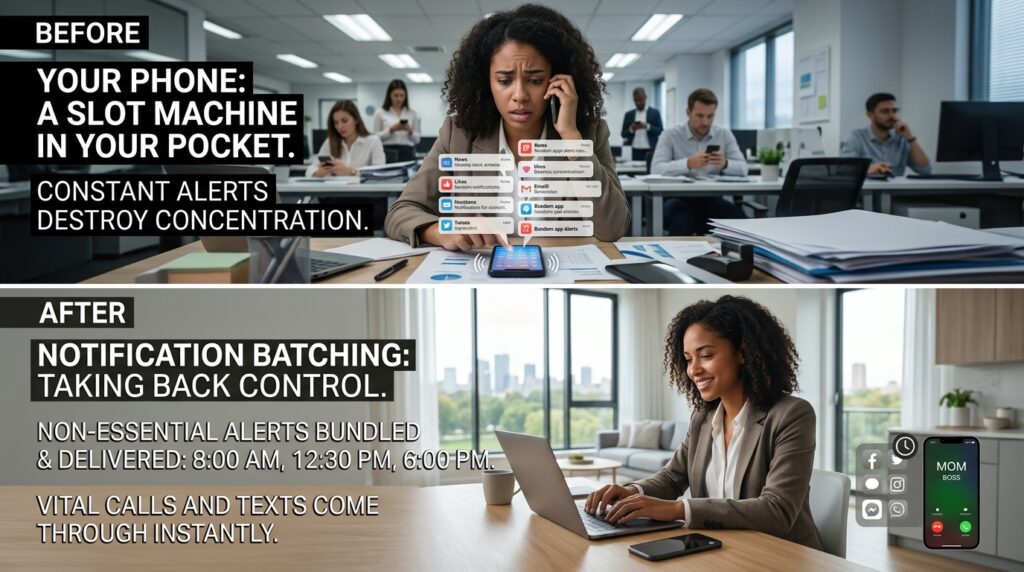
A smartphone is essentially a slot machine that lives in your pocket. Every time it vibrates or pings, your brain releases a tiny hit of dopamine, anticipating a reward. App developers know this. That is why they send you notifications for everything—from breaking political news to reminding you that someone you barely know just uploaded a new photo.
These constant interruptions absolutely shatter your ability to concentrate.
Instead of turning off my notifications entirely (which gave me anxiety about missing something truly important), I started using a notification batching app. On Android, I used an app called Daywise (on iOS, the native “Scheduled Summary” feature does exactly the same thing).
This software intercepts every non-essential notification before it ever reaches my screen.
Instead of my phone buzzing thirty times throughout the workday, it remains completely silent. The app catches all the social media tags, promotional emails, and news alerts, and holds them in a hidden vault. Then, it delivers them to me in a neat, consolidated bundle exactly three times a day: at 8:00 AM, 12:30 PM, and 6:00 PM.
If my mother calls me, or my boss texts me, it comes through immediately. But everything else is held back. I no longer react to my phone’s schedule; my phone reacts to mine.
4. Stripping the Interface: Niagara Launcher
Smartphone interfaces are designed to be addictive. The icons are colorful and glossy, engineered by graphic designers to draw your eye. The little red notification badges trigger an innate sense of urgency. When you unlock your phone, you are looking at a digital candy store.
I needed my phone to look like a tool, not a toy.
I downloaded a minimalist interface replacement called Niagara Launcher.
When I installed this app, my phone completely transformed. The colorful grid of apps vanished. The widgets disappeared. The red notification dots were eradicated.
My home screen became a solid black background with a simple, elegant list of white text. It just says: Phone. Messages. Calendar. Browser.
If I want to open a distracting app, I have to swipe up, open a search bar, and physically type the name of the app on my keyboard. This adds a critical three seconds of friction to the process. In those three seconds, my prefrontal cortex has a chance to engage and ask, “Wait, why are we opening this app? Do we actually need to, or are we just bored?”
By removing the colorful visual triggers, my phone became incredibly boring to look at. Streamlining the UI and removing the shiny distractions is a core part of the system I built, which I broke down completely in How to Automate Repetitive Tasks on Your Phone. When your device looks like a serious piece of hardware, you start treating it like one.
5. Gamifying My Attention Span: Forest
There are moments when I am working on my laptop, and I simply need my phone to stay locked and out of my hands for a solid hour. But even with app blockers turned on, the physical urge to pick up the device and just swipe around the home screen is incredibly strong.
To keep my hands off the device entirely, I use an app called Forest.
Forest is a brilliant, gamified focus timer. When I sit down to do deep work, I open the Forest app and plant a digital seed. I set the timer for 45 minutes.
Over the next 45 minutes, as long as I do not exit the app, that seed slowly grows into a beautiful, vibrant digital tree on my screen.
But if I succumb to distraction—if I hit the home button to check my text messages or look at the weather—the app issues a warning. If I leave the app, my digital tree instantly withers and dies. The dead tree is permanently logged in my virtual forest as a monument to my failure.
It sounds utterly ridiculous, but humans are highly empathetic creatures. I will literally be sitting at my desk, desperately wanting to pick up my phone, but I will stop myself because I don’t want to kill my virtual pine tree. It provides just enough emotional friction to keep my hands on my keyboard.
6. Masking the Physical World: Endel
Distractions don’t just come from inside the phone; they come from the environment around you.
If I am working from a coffee shop, or even just sitting in my living room while my family is moving around, my attention is constantly pulled away by conversations, barking dogs, and slamming doors.
I used to put on my favorite music to block out the noise, but I realized that listening to songs with lyrics was just replacing one distraction with another. My brain was actively trying to process the words of the song, preventing me from entering a flow state.
I discovered an app called Endel, and it completely changed my acoustic environment.
Endel uses artificial intelligence to generate infinite, continuous soundscapes designed specifically to improve focus. It doesn’t play songs; it plays adaptive, ambient audio that matches your circadian rhythm and heart rate.
When I need to focus, I put in my noise-canceling earbuds, open Endel, and hit “Deep Work.” The app generates a pulsing, low-frequency hum that entirely masks the physical world around me. Because there are no distinct melodies or lyrics, my brain completely tunes the audio out after two minutes. It acts as a warm acoustic blanket, protecting my thoughts from the chaos of the room. Optimizing my sensory input was the final, critical step in the process I mapped out in How I Turn My Phone Into a Productivity Powerhouse. You have to insulate your mind if you want to produce great work.

Final Thoughts: From Consumer to Creator
For years, I viewed my smartphone as a master that I had to serve. When it beeped, I answered. When it showed me a bright red dot, I tapped it. I was a passive consumer, letting algorithms dictate where my most valuable resource—my attention—was being spent.
The realization that changed my life was that the smartphone has no inherent intent. It is just a piece of glass and silicon.
It can be a slot machine that steals hours of your life, or it can be a highly customized fortress that protects your focus. The choice ultimately comes down to how you configure the software.
You do not have to live in a constant state of digital overwhelm. Take an hour this weekend to audit your device. Look at your real screen time data. Download an app blocker. Batch your notifications. Turn your home screen black and white.
When you intentionally introduce friction to your bad habits and make the right choices automatic, a profound sense of calm washes over your daily life. You stop reacting to the noise, and you finally regain the silence you need to actually think.
