
Every Sunday morning at exactly 9:00 AM, my smartphone delivers a push notification that used to completely ruin my mood: the weekly Screen Time report.
For a long time, I dreaded tapping on that little alert. When I finally gathered the courage to look, the numbers were always staggering. Five hours a day. Six hours a day. Sometimes seven. And the worst part wasn’t the sheer volume of time I was spending staring at a glowing rectangle; it was what I was doing with that time.
The pie chart on my screen was always dominated by social media algorithms, endless scrolling, and playing mobile games while I was supposed to be working.
I was holding a literal supercomputer in the palm of my hand—a device with more processing power than the machines that put humanity on the moon—and I was using it to look at memes while my actual, real-life goals gathered dust. It made me feel incredibly guilty and chronically behind schedule.
My first instinct was to go full digital minimalist. I tried turning my phone off during the workday. I tried leaving it in another room. But that is simply not a realistic solution in the modern world. You need your phone for two-factor authentication, urgent client calls, and family emergencies.
Eventually, I had a realization. The problem wasn’t the hardware. The glass and metal in my pocket were entirely neutral. The problem was the software ecosystem I had built. I had populated my home screen with digital slot machines instead of power tools.
I decided to completely weaponize my device. I ruthlessly deleted every single app that stole my attention and replaced them with tools designed specifically to multiply my output. If you are tired of your phone being a source of distraction and want to turn it into an absolute workhorse, here are the 7 apps that completely transformed my mobile device.
1. Todoist: The Cognitive Relief Valve
For years, I tried to use my brain as a filing cabinet. I would walk around repeating things to myself: “Don’t forget to email the accountant. Pick up milk on the way home. Send the draft by Friday.”
This created a constant, low-grade hum of anxiety in the background of my life. I was always terrified I was going to drop the ball.
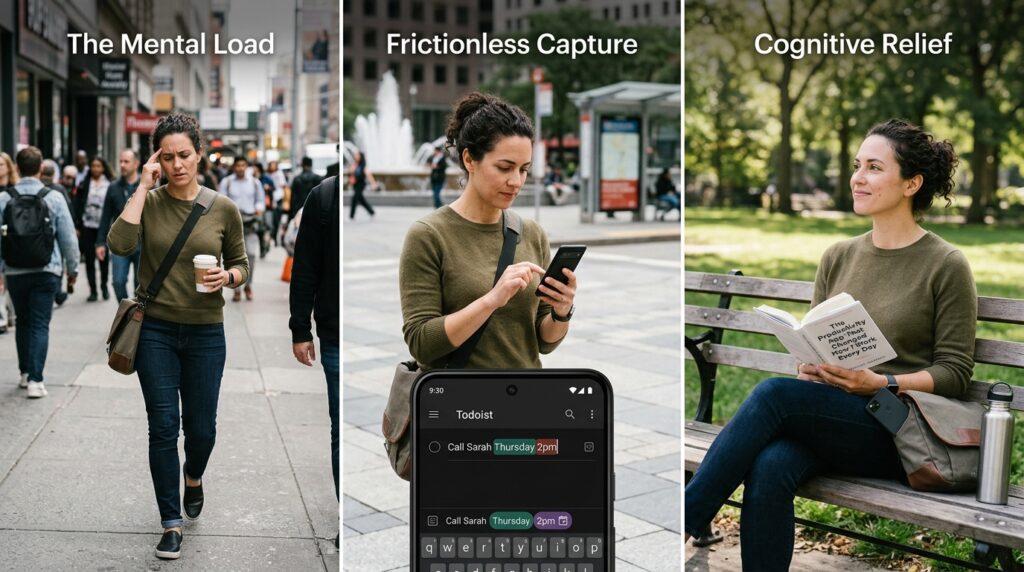
Todoist became my cognitive relief valve. It is an incredibly sleek, fast task manager that excels at what productivity experts call “quick capture.”
If I am walking down the street and suddenly remember I need to call a client, I don’t try to hold that thought in my head. I pull out my phone, open Todoist, and type: “Call Sarah on Thursday at 2pm.”
The app uses natural language processing. It instantly understands the date and time, schedules the task, and removes it from my current view. I can put my phone back in my pocket in under five seconds, knowing with absolute certainty that the software will remind me when the time comes.
When you stop trying to remember everything, your brain is free to actually process things. I wrote extensively about this transition in my piece on (The Productivity App That Changed How I Work Every Day), detailing how shifting tasks out of my brain fundamentally changed my life. Todoist makes this shift entirely frictionless.
2. Notion: The Pocket-Sized Second Brain
If Todoist handles my quick tasks, Notion handles absolutely everything else.
Before I discovered Notion, my information was scattered across a terrifying digital wasteland. I had grocery lists in Apple Notes, blog outlines in Google Docs, saved links in my browser bookmarks, and project details buried deep in old email threads. Finding anything took twenty minutes of searching.
Notion is a deeply customizable workspace that acts as a “second brain.”
I spent a weekend building a master dashboard on the desktop version, and the mobile app syncs flawlessly. Now, when I am sitting on a train commuting to a meeting, I can pull up my phone and access my entire life. I have a database for my current work projects, a reading list with notes on every book I’ve read this year, and a shared travel itinerary with my partner.
Keeping track of different deliverables was a nightmare before I built this unified dashboard, a process I explain thoroughly in (How I Stay Organized While Managing Multiple Projects). Now, everything lives in one highly structured, searchable application right in my pocket.
3. Forest: The Gamified Bouncer
Even with the best task manager and the most organized database, the modern internet is a minefield of distractions. It is incredibly hard to focus on a difficult project when Instagram is just one tap away.
I needed a way to manufacture discipline. I needed a digital bouncer. Enter the Forest app.
Forest is essentially a focus timer wrapped in a brilliant layer of psychological gamification. When I need to sit down and do deep work, I open the app and plant a virtual seed. I set a timer—usually for 45 minutes.
As the timer ticks down, my seed slowly grows into a digital tree. But here is the catch: if I exit the Forest app to check Twitter, read a text message, or scroll through the news, my virtual tree instantly withers and dies.
It sounds incredibly silly, but the human brain hates breaking a streak and destroying something it has nurtured. Countless times, my thumb has instinctively swiped toward my social media folder, only to stop because I didn’t want to kill the little digital pine tree growing on my screen. It physically blocks me from my own worst impulses.
4. Spark: The Ruthless Inbox Manager
Checking email on a smartphone is usually a miserable experience.
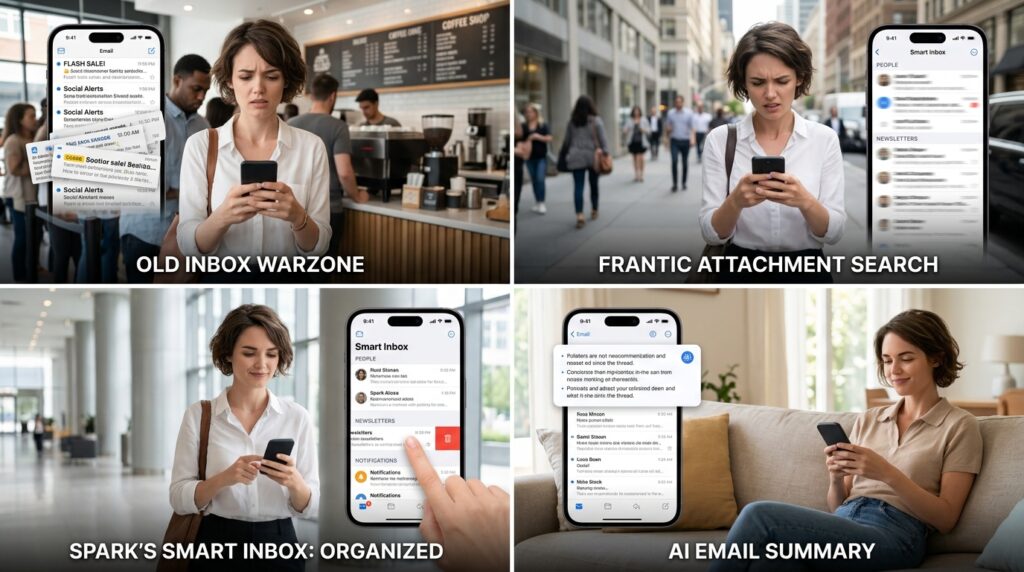
I remember standing in line at a coffee shop, trying to quickly find an important PDF attachment a client had sent me the day before. I opened my native email app and was immediately assaulted by forty-two new emails, almost all of them promotional newsletters and automated social media alerts. By the time I found the attachment, I was stressed out and annoyed.
I switched to Spark, and it completely revolutionized my mobile email experience.
Spark features a “Smart Inbox.” It uses an algorithm to automatically categorize your incoming mail. When I open the app on my phone, the screen is split. At the top, it only shows emails from actual, real human beings. Below that, it groups all the newsletters into one block, and all the notifications into another.
I can literally swipe the entire block of newsletters into the trash with a single gesture. Furthermore, it has a built-in AI assistant that can summarize long, rambling email threads into three bullet points. It turns my inbox from a chaotic warzone into a highly curated, manageable list.
5. Reclaim AI: The Calendar Bodyguard
You can have a list of fifty things you need to do, but if you don’t actually put them on your calendar, they are never going to get done. Your day will inevitably be hijacked by other people’s emergencies and back-to-back meetings.
Reclaim AI is an intelligent calendar assistant that fights back for your time.
You connect it to your Google Calendar and input your habits and tasks. You tell the app, “I need to work out for 45 minutes today, I need 30 minutes for lunch, and I need two hours to write this report.”
Reclaim operates in the background and constantly shifts your schedule like a game of Tetris. It finds the blank spaces in your day and automatically blocks them off for your deep work. If someone tries to schedule a meeting over your writing time, Reclaim automatically moves your writing block to the next available slot. It aggressively defends your time, ensuring that the work that actually moves the needle gets prioritized.
6. Toggl Track: The Brutal Time Auditor
We all lie to ourselves about how much we actually work.
I used to finish an eight-hour day at the office feeling completely exhausted, convinced I had just crushed a massive amount of productive work. But when I looked at my output, the math didn’t add up.
I downloaded the Toggl Track widget to my phone’s home screen. It is a deceptively simple timer. Whenever I sit down to do a task, I tap the widget and hit “Start.” When I stop working to go to the bathroom, grab a coffee, or chat with a coworker, I hit “Stop.”
The data was brutal but necessary. I realized I wasn’t doing eight hours of focused work; I was doing about three hours of work, heavily padded with context switching and passive distractions. Seeing the cold, hard timer running on my screen forces me to stay locked into the task. It holds me accountable to the clock and ensures that when I say I am working, I am actually working.
7. Apple Shortcuts (or Tasker for Android): The Invisible Assistant
The final frontier of turning your phone into a productivity machine is realizing that you shouldn’t have to manually tap the screen for every single action. Your phone can perform complex routines completely on its own.
I started diving heavily into the native Apple Shortcuts app (Android users can use Tasker for an even more powerful experience).
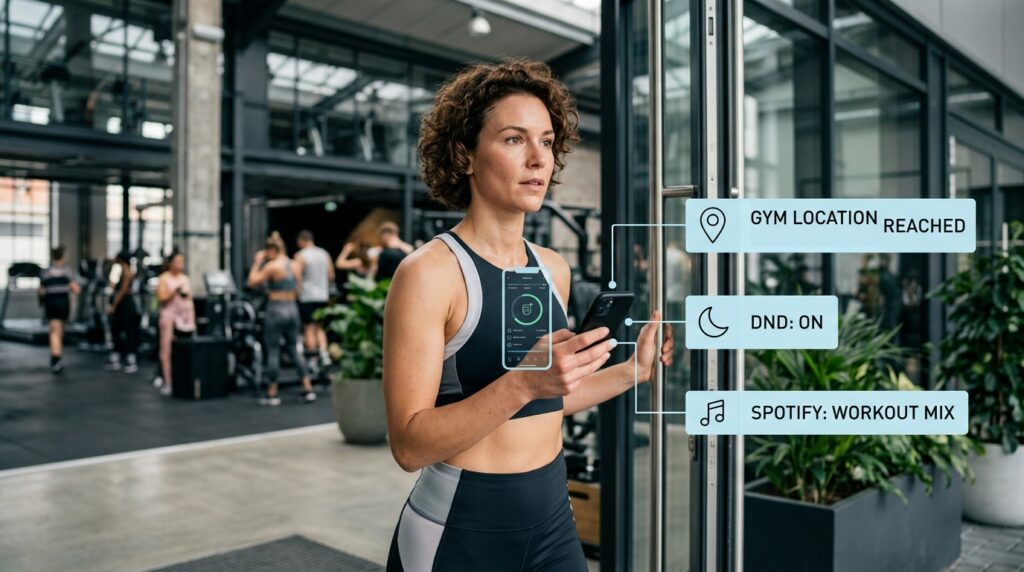
Shortcuts allow you to string multiple actions together and trigger them automatically. For example, I built a “Gym Routine” shortcut. When my phone detects that I have physically arrived at the GPS location of my gym, it automatically puts my phone in “Do Not Disturb” mode, opens my workout tracking app, and starts playing my specific gym playlist on Spotify. I don’t have to touch a single button.
I have another shortcut that triggers when I tap my phone against an NFC tag on my office desk; it automatically texts my partner that I am heading home and pulls up the fastest route on Google Maps.
If you want to dive deeper into how this works, check out my guide on (How I Automated My Daily Tasks With Mobile Apps). Automation buys back your most precious resource: time. It handles the repetitive digital chores in the background so you don’t have to.
Final Thoughts on Digital Intentionality
Your smartphone is not inherently evil. It is not a parasite designed to steal your attention, even if some of the companies building the apps want you to treat it that way.
It is simply a tool. If you hand a carpenter a hammer, they can use it to build a beautiful house, or they can use it to smash their own thumb. The tool doesn’t care. The outcome depends entirely on the intention of the user.
When you look at your home screen today, ask yourself a hard question: Are these apps working for me, or am I working for them?
If your first screen is full of social media feeds, news aggregators, and mobile games, you are setting yourself up for failure before your day even begins. You are inviting distraction into your life.
Take an hour this weekend to purge your device. Delete the slot machines. Download the task managers, the calendar bodyguards, and the automation engines. Rearrange your home screen so that the tools you actually want to use are front and center.
When you finally take control of the software, the anxiety fades. You stop feeling like you are constantly drowning in notifications, and you start experiencing the profound leverage that comes from carrying a highly calibrated productivity machine in your pocket.
