
We are constantly bombarded with an overwhelming amount of information. Between meeting minutes, brilliant midnight ideas, grocery lists, interesting podcast quotes, and project deadlines, the human brain is simply not equipped to hold it all. Trying to remember everything is a surefire recipe for burnout, anxiety, and dropped responsibilities.
The solution isn’t to train your brain to remember more; the solution is to build an external system that remembers it for you.
However, finding the right digital tool to act as your “second brain” can be a daunting task. The app store is flooded with options, ranging from hyper-minimalist text editors to incredibly complex relational databases. Choosing the wrong tool can lead to even more frustration, turning your digital workspace into a chaotic junk drawer of lost ideas. In fact, selecting the right foundation is a critical first step, something deeply explored in the guide on (10 Apps That Helped Me Declutter My Digital Space).
To save you from the exhaustion of endless trial and error, here is a comprehensive breakdown of the 10 best note-taking apps available today, categorized by the specific type of thinker and workflow they serve best.
1. Notion: The Ultimate “All-in-One” Workspace
Notion is less of a standard note-taking app and more of a digital box of Lego bricks. It provides you with blocks of text, toggle lists, Kanban boards, calendars, and highly customizable databases, allowing you to build an organizational system that perfectly matches your brain.
How it helps you stay organized: Instead of just writing a list of project ideas, Notion allows you to create a database where each idea can be tagged with a status, assigned a priority level, and linked to a specific team member. You can view that same data as a simple list, a timeline, or a visual board.
Best for: People who love structure, project managers, and anyone who wants to consolidate their to-do lists, wikis, and notes into one single, unified application.

2. Evernote: The Undisputed King of Capture
Evernote has been around for a long time, and it has survived the highly competitive productivity market for one simple reason: nothing captures external information better. It uses a traditional “Notebook and Tag” system, making it feel very familiar to anyone transitioning from physical paper.
How it helps you stay organized: Evernote’s true superpower is its Web Clipper browser extension and its Optical Character Recognition (OCR). If you find a recipe online, you can clip the entire article directly into a notebook with two clicks. If you take a photo of a physical handwritten receipt or a whiteboard, Evernote can read the handwriting and make that image entirely searchable.
Best for: Researchers, digital hoarders, and professionals who need a reliable “filing cabinet” for PDFs, web clippings, and scanned documents.
3. Obsidian: The Networked Thinking Powerhouse
If you are tired of the rigid, top-down structure of traditional folders, Obsidian offers a completely different philosophy. It is built on the concept of “bi-directional linking,” allowing you to connect your thoughts organically, much like the neural pathways in your actual brain. For a deeper dive into how this specific methodology transforms workflows, it is highly recommended to read (Why I Switched to This Note-Taking App and Never Looked Back).
How it helps you stay organized: Instead of worrying about which folder a note belongs in, you simply type your thoughts and wrap key concepts in brackets. This creates a hyperlinked web of knowledge. Over time, Obsidian generates a visual “Graph View,” showing you how your seemingly unrelated notes on philosophy, marketing, and fitness actually intersect. Furthermore, Obsidian saves all your notes as local, plain-text Markdown files on your hard drive, ensuring your data is future-proof and entirely under your control.
Best for: Writers, academics, developers, and anyone interested in building a long-term “Second Brain” or Zettelkasten system.
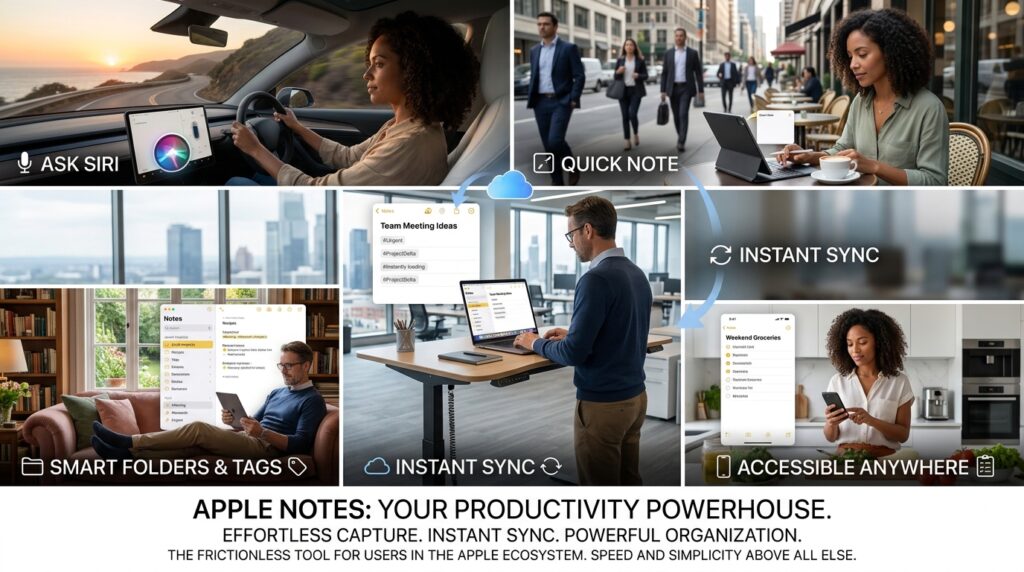
4. Apple Notes: The Frictionless Default
It is easy to dismiss the native apps that come pre-installed on our devices, but Apple Notes has quietly evolved into an absolute powerhouse of productivity, especially if you are deeply entrenched in the Apple ecosystem.
How it helps you stay organized: The greatest advantage of Apple Notes is its lack of friction. You don’t have to wait for a heavy database to load. You can ask Siri to take a note while driving, use the Quick Note feature by swiping from the corner of your iPad, or simply start typing on your Mac. The synchronization is instant and flawless. With recent updates bringing Smart Folders and robust tagging, it offers surprisingly deep organizational capabilities without overwhelming the user.
Best for: Users fully immersed in the Apple ecosystem who prioritize speed, simplicity, and immediate capture above all else.
5. Google Keep: The Digital Sticky Note Board
Sometimes, you don’t need a complex database; you just need a place to quickly jot down a Wi-Fi password, a shopping list, or a fleeting thought. Google Keep perfectly replicates the visual, spatial organization of a corkboard covered in brightly colored sticky notes.
How it helps you stay organized: Google Keep forces you to be concise. It thrives on quick lists and short reminders. You can color-code your notes (e.g., green for groceries, red for urgent work tasks), pin the most important ones to the top of your feed, and even set location-based reminders so a note automatically pops up on your phone when you physically arrive at the hardware store.
Best for: Visual thinkers, Android users, and people who need a rapid-fire inbox for transient thoughts and simple checklists.
6. Microsoft OneNote: The Infinite Canvas
If you grew up organizing your schoolwork in massive, tabbed physical binders, Microsoft OneNote will feel like coming home. It uses a very literal skeuomorphic design, breaking your digital workspace down into Notebooks, Sections, and Pages.
How it helps you stay organized: Unlike almost every other app on this list, OneNote provides a truly infinite, freeform canvas. You don’t have to type in a straight, linear line. You can click anywhere on the screen and start typing. You can drop a YouTube video next to a PDF, and then use a digital stylus to draw arrows connecting them. It is chaotic in the best way possible, allowing for intense, multimedia brainstorming sessions.
Best for: Students taking lecture notes, visual brainstormers, and anyone who uses a tablet with a stylus (like a Surface Pro) as their primary device.
7. Bear: The Aesthetic Writer’s Retreat
For some people, the design and typography of an app drastically influence their willingness to use it. If an app is ugly or cluttered, the creative juices simply stop flowing. Bear is designed specifically to be beautiful, offering a pristine, distraction-free environment for macOS and iOS users.
How it helps you stay organized: Bear completely abandons the concept of folders. Instead, it relies entirely on a highly flexible, nested hashtag system. If you write a note and type #work/marketing/campaign_ideas at the bottom, Bear automatically creates that exact folder hierarchy in your sidebar. It allows you to organize your thoughts at the exact same moment you are writing them, without ever having to take your hands off the keyboard to click through menus.
Best for: Bloggers, creative writers, and design-conscious Apple users who want a beautiful, markdown-focused writing environment.
8. Simplenote: Pure, Unadulterated Speed
Developed by Automattic (the company behind WordPress), Simplenote lives entirely up to its name. It does one thing, and it does it better than almost anyone else: it syncs plain text across every platform imaginable at blazing speeds.
How it helps you stay organized: Simplenote strips away all the distracting features that often lead to productive procrastination. There are no formatting toolbars, no image attachments, and no complex databases. It is just you and your words. This extreme limitation is actually a massive organizational benefit. It forces you to focus purely on the content of your thoughts. It also features an incredible version history slider, allowing you to instantly restore a note to a previous state if you accidentally delete an important paragraph.
Best for: Minimalists, cross-platform users (Windows, Mac, Android, iOS, Linux), and people who get easily distracted by formatting options.
9. Roam Research: The Tool for Networked Outlining
While Obsidian (mentioned earlier) focuses on linking entire documents together, Roam Research takes networked thinking down to a granular level. Roam is fundamentally an outliner—everything you write is a bullet point.
How it helps you stay organized: Every single bullet point (or “block”) in Roam is its own entity and can be embedded or linked anywhere else in your database. This is a massive breakthrough for research organization. If you are reading a book and taking bulleted notes, you can tag specific bullets. Later, when you are writing an essay, you can pull those exact bullet points from dozens of different sources into a single page without losing their original context. To understand how to best implement these rapid-fire structuring techniques, it is worth exploring other (Apps That Help Me Take Notes and Organize Ideas Quickly).
Best for: Academic researchers, heavy outliners, and knowledge workers dealing with complex, multi-layered data synthesis.
10. GoodNotes: The Champion of Digital Handwriting
There is a vast amount of cognitive research proving that physically writing things down by hand improves memory retention significantly more than typing on a keyboard. But carrying around heavy notebooks and losing your pens is a hassle. GoodNotes bridges the gap between analog retention and digital convenience.
How it helps you stay organized: Built primarily for the iPad and the Apple Pencil, GoodNotes provides an incredibly realistic writing experience. You can create custom digital notebooks with different paper templates (lined, dotted, sheet music, planners). More importantly, GoodNotes indexes your handwriting. This means you can write a messy grocery list by hand, and then use the app’s search bar to find the word “Apples” hidden on page 42 of your notebook. It also excels at importing massive PDF documents and textbooks, allowing you to highlight and annotate directly on the pages.
Best for: Students, artists, designers, and anyone who thinks better with a pen in their hand but wants the searchability of a digital archive.

Final Thoughts: Choosing Your System
Looking at this list, it is easy to fall into the trap of “Shiny Object Syndrome.” You might be tempted to download all ten apps and try to use them simultaneously. Resist that urge.
The truth about digital organization is that the software is only 10% of the equation; your personal discipline and workflow make up the remaining 90%. A brilliantly designed database in Notion is entirely useless if you never actually open it to review your tasks. A lightning-fast quick-capture tool in Apple Notes is pointless if you never process those notes into actionable steps.
When choosing from this list, ask yourself one primary question: How does my brain naturally categorize information?
-
If you think in strict hierarchies and categories, lean toward Evernote or Notion.
-
If your thoughts are messy, interconnected, and free-flowing, dive into Obsidian or Roam Research.
-
If you need speed and visual simplicity above all else, stick to Apple Notes or Google Keep.
Pick one tool. Commit to learning its keyboard shortcuts and its organizational philosophy. Spend thirty days putting every single thought, meeting note, and project idea into that one specific app. Once you stop fighting your software and start trusting your system, you will finally unlock the mental clarity you have been searching for.
