
Let me set the scene for you. It was a Tuesday morning, right in the middle of a high-stakes Zoom meeting with a major client. We were discussing a marketing campaign we had brainstormed three months prior.
Suddenly, the client’s marketing director asked, “Hey, what was that specific angle we discussed for the email sequence? You mentioned a really great phrase back in October.”
My heart instantly dropped into my stomach.
I smiled at the camera, nodded confidently, and muttered, “Great question, let me just pull that up real quick.”
Off-camera, my hands were flying across my keyboard in a state of pure, unfiltered panic.
Where had I written it down? Was it in my physical Moleskine notebook that I leave on my desk? Was it in Apple Notes on my phone? Did I type it into a random Google Doc that was currently titled “Untitled Document (47)”? Or worse, did I just write it on a yellow sticky note that had since lost its stickiness and fallen behind my monitor?
After sixty seconds of excruciating silence and frantic clicking, I had to confess that I couldn’t find it. I looked disorganized, unprofessional, and entirely unprepared.
That humiliating moment was my wake-up call. I realized that my system for capturing information was completely broken. I wasn’t just losing marketing phrases; I was losing book recommendations, brilliant midnight ideas, important life lessons, and critical project details. I was suffering from severe digital hoarding without any actual organization.
The Problem With the “Filing Cabinet” Method
For the longest time, I believed that the secret to getting organized was finding the perfect folder structure.
I thought if I just created enough sub-folders, everything would magically fall into place. I used traditional note-taking apps and built massive, complex hierarchies. I had a folder for “Work,” a sub-folder for “Clients,” a sub-folder for “Marketing,” and a sub-folder for “Brainstorming.”
But the human brain doesn’t work like a 1950s metal filing cabinet.
Think about it. If you read a fascinating article about the psychology of habit formation, where do you save those notes? Do you put them in the “Psychology” folder? The “Self-Improvement” folder? Or the “Current Project” folder where you are designing a habit-tracking feature?
Because traditional apps force you to put one note into exactly one box, it creates massive friction. Every time I wanted to write something down, I had to spend mental energy deciding where it belonged. Half the time, I would get frustrated and just dump it into a folder labeled “Miscellaneous”—the digital equivalent of a junk drawer.
When you hide information inside deep folders, it dies. You never see it again. I needed a system that actually reflected how human thought works. I needed a system based on connections, not isolation.

Discovering the Magic of Networked Thought
I began tearing through the internet, desperately searching for a better way. During my deep dive into various productivity systems, I actually ended up testing several tools, which I eventually documented when exploring different (Apps That Help Me Take Notes and Organize Ideas Quickly).
Through that trial-and-error process, I discovered a completely different philosophy of note-taking. It’s a concept built on “bi-directional linking,” and it completely blew my mind. (For this article, I am describing my experience with apps like Obsidian or Roam Research, which champion this methodology).
When I first downloaded the app, I was initially underwhelmed. There were no colorful folders. There were no complex priority matrixes. It was just a blank screen.
But then I learned the one simple trick that changed everything: the brackets.
Whenever I type a word or phrase inside double brackets—like this: [[Habit Formation]]—the app instantly creates a dedicated page for that topic. If that page already exists, it creates a permanent hyperlink to it.
This sounds like a minor technical feature, but the implications are staggering.
Writing at the Speed of Thought
Let me explain how this completely eliminated the friction of capturing ideas.
Now, when I am in a meeting, I don’t look for a specific folder. I just open a new note. I write down what the client is saying. If they mention our new social media strategy, I just put brackets around [[Social Media Strategy]].
I don’t have to file the note. The link is the filing.
If I click on the [[Social Media Strategy]] link six months from now, the app will show me every single meeting, every single random thought, and every single article I have ever written that links back to that concept. It aggregates my knowledge automatically from the bottom up, rather than forcing me to organize it from the top down.
I no longer have to worry about where a piece of information lives. I just write naturally, link the key concepts, and trust the software to build the connections in the background. It feels less like archiving data and more like having a conversation with my own brain.
The Power of the “Daily Note”
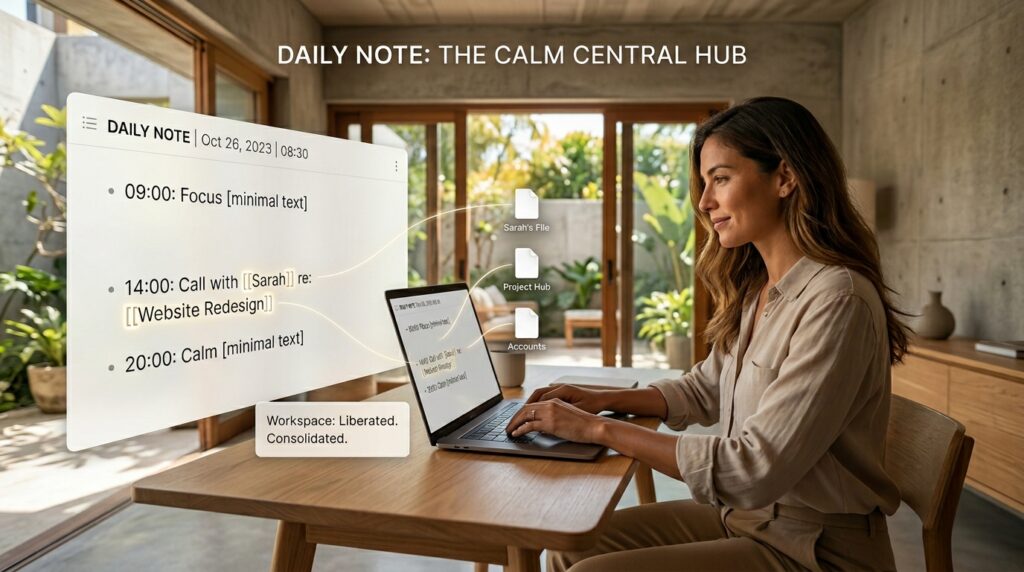
The feature that truly cemented this app as my permanent digital home is the Daily Note.
Every single morning, when I open the app, it automatically generates a fresh, blank page with today’s date as the title.
This is my launchpad. I don’t have to stare at a menu and decide what to work on. I just start typing. I use the daily note as a scratchpad for my entire existence.
At 9:00 AM, I might write down the three most important tasks for my workday. At 11:30 AM, I might jot down a random idea for a blog post. At 2:00 PM, I might take notes during a phone call with my accountant. At 8:00 PM, I might write a quick journal entry about how I’m feeling.
All of this happens on one single, continuous page. But because I am using the double-bracket linking system, none of it gets lost.
If I type: “Had a great call with [[Sarah]] about the new [[Website Redesign]],” those pieces of information are instantly sent to Sarah’s personal file and the project file, respectively.
This completely cured my digital hoarding. I used to have dozens of apps cluttering my screen, trying to manage different parts of my life. This single feature allowed me to consolidate everything, a process I found so liberating that it inspired me to write a separate guide on (10 Apps That Helped Me Declutter My Digital Space). By relying on the Daily Note, my digital workspace finally felt calm and spacious.
Seeing Your Brain on the Screen
If you are a visual person, there is one feature of these networked note-taking apps that will absolutely hook you: the Graph View.
Because every note is linked to other notes, the app can generate a visual map of your entire database. Every note is a dot, and every link is a line connecting them.
The first time I opened my Graph View after a month of using the app, I actually gasped.
I was looking at a digital representation of my own mind. There were massive clusters of dots around topics I think about constantly—like “Writing,” “Marketing,” and “Coffee.” But more importantly, I could see unexpected connections.
I could see a line connecting a note I took on “Stoic Philosophy” to a note I took on “Managing Client Expectations.” The visual map showed me a relationship between two entirely different concepts that I never would have realized on my own.
This is where the app transforms from a simple storage unit into an active thinking partner. It doesn’t just hold your ideas; it helps you generate new ones by showing you how your disparate thoughts intersect.
Overcoming the Learning Curve
I promised an honest review, so I cannot pretend that this transition was entirely effortless.
Moving from a traditional, folder-based app (like Apple Notes or Google Keep) to a networked thinking app requires a profound mental shift. For the first two weeks, I felt incredibly uncomfortable. I kept wanting to drag and drop files into folders. I felt like my information was floating in a void.
There is also a very real danger of “productive procrastination.”
These advanced apps are incredibly customizable. You can change the themes, install hundreds of community plugins, write custom CSS code, and build complex query tables.
During my third week, I spent four hours trying to install a plugin that would automatically track my daily mood with a color-coded calendar. I didn’t write a single word that day. I was just playing with the software.
I had to intervene and set strict rules for myself. The goal of a productivity system is to produce work, not to endlessly maintain the system itself. This realization was hard-won, and it formed the core of the lessons I later shared in my piece on (Strategies I Learned From Productivity Apps That Actually Work). You have to embrace simplicity. I uninstalled all the fancy plugins, reverted to the default theme, and focused entirely on just writing and linking.
Once I stopped treating the app like a toy and started treating it like a tool, my output skyrocketed.
Building a “Second Brain”
There is a popular concept in the productivity community called building a “Second Brain.”
The idea is that your biological brain is meant for processing, not for storage. By offloading all the heavy lifting of remembering facts, quotes, deadlines, and project details to a digital system, you free up massive amounts of cognitive energy.
Before I switched to this app, my biological brain was exhausted. I was constantly experiencing that low-grade anxiety of feeling like I was forgetting something crucial.
Now, I have absolute trust in my system.
When I read a brilliant book, I don’t stress about trying to memorize the best quotes. I just highlight them, export them into my app, and tag them. I know with absolute certainty that if I ever need to write an article about that topic five years from now, my Second Brain will have the exact quote waiting for me, perfectly preserved.
This system has fundamentally changed how I consume information. I am no longer just passively reading articles or listening to podcasts. I am actively hunting for valuable ideas to capture and connect within my database. It has made me a sharper thinker and a vastly more prolific writer.
The Security of Future-Proofing
One of the most terrifying things about relying on mobile applications is the fear of losing access to your data.
I once used an incredible task management app that suddenly went out of business. The servers shut down, and I lost two years’ worth of project histories overnight. It was devastating.
When I was evaluating this new note-taking methodology, data security was my top priority. The beauty of the specific tools I lean toward now is that they use local, plain-text markdown files.
What does that mean in non-technical terms?
It means my notes are not locked away on some massive corporation’s server in the cloud. The files live directly on the hard drive of my laptop and sync to my phone. If the company that makes the app goes out of business tomorrow, my notes are completely safe. I can open them in any basic text editor on any computer in the world.
This provides a level of peace of mind that proprietary, cloud-only apps simply cannot match. I am building a knowledge base that I intend to use for the next forty years; I need to know the foundation is indestructible.

Final Thoughts on Making the Switch
We spend so much of our lives consuming information. We read books, watch documentaries, attend seminars, and listen to brilliant people. But if we don’t have a reliable way to capture and connect that information, it all just slips through our fingers like sand.
Switching to a networked note-taking app wasn’t just a software upgrade for me. It was a complete upgrade to my intellectual operating system.
It cured the anxiety of the blank page. When I sit down to write an article now, I don’t start from scratch. I just open my app, search for the topic, and pull together the dozens of thoughts, quotes, and observations I have already collected over the past year. The writing practically does itself.
If you are tired of losing your best ideas to the void of a chaotic digital junk drawer, I urge you to reconsider how you take notes. Stop trying to force your organic, creative thoughts into rigid, alphabetical folders.
Embrace the links. Let your ideas connect naturally. It might take a few weeks to get used to the workflow, but I promise you, once the concept of networked thought finally clicks in your brain, you will never look back at a traditional filing cabinet again.
