
Let me take you back to a Tuesday afternoon about three years ago. I was sitting at my desk, staring blankly at my dual monitors. I had exactly forty-two browser tabs open. My email inbox had 300 unread messages, my phone was buzzing with notifications from three different messaging platforms, and I was holding a lukewarm cup of coffee that I had forgotten to drink.
I had been sitting in that exact chair for nine hours. I was completely, utterly exhausted.
Yet, if you had asked me what I had actually accomplished that day, I would have struggled to name a single meaningful thing.
I was caught in the worst possible professional trap: I was incredibly busy, but entirely unproductive. I was mistaking motion for progress. I spent my days reacting to other people’s emergencies, putting out digital fires, and shuffling digital papers around without actually moving any of my core projects forward.
I hit a breaking point that afternoon. I realized that my problem wasn’t a lack of work ethic; it was a complete lack of infrastructure. I was trying to build a skyscraper using a plastic toy hammer.
I needed to fire myself as the chaotic manager of my own life and hire software to do the heavy lifting. Over the next year, I ruthlessly audited my workflow. I tested, discarded, and refined my digital tools until I built a “productivity stack” that actually worked.
If you are feeling overwhelmed, drowning in busywork, and ending your days feeling defeated, you don’t need to hustle harder. You need better tools. Here are the 9 productivity apps that fundamentally changed my work life.
1. The Frictionless Task Manager
For years, my task management system was a horrific combination of sticky notes, unread emails acting as reminders, and sheer, terrified memory. It was stressful, and things constantly slipped through the cracks.
I needed a dedicated task manager, but more importantly, I needed one with zero friction. I wrote an entire piece on (How a Simple To-Do App Made My Life Less Stressful), but the core philosophy comes down to a concept called “quick capture.”
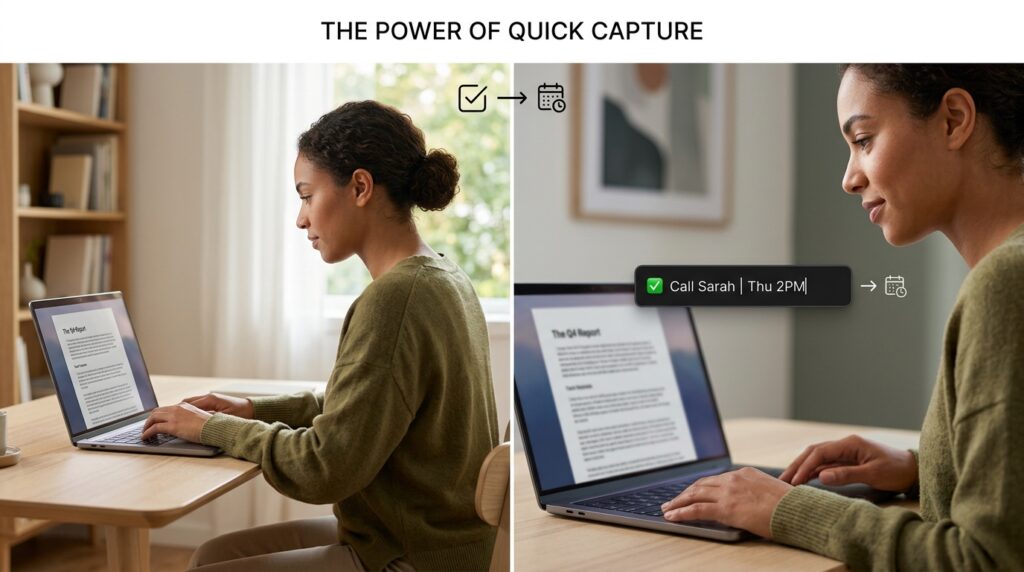
The app I use now (think Todoist or TickTick) operates on natural language processing. If I am in the middle of writing a report and I remember I need to call a client, I don’t break my focus. I hit a global keyboard shortcut, a tiny text box pops up, and I type: “Call Sarah on Thursday at 2pm.”
I hit enter, the box disappears, and the app automatically parses the date and time, schedules the task, and hides it until Thursday at 2:00 PM. I don’t have to click through menus or calendars. I get the thought out of my head in three seconds and go right back to my deep work.
2. The Unforgiving Time Auditor
We all lie to ourselves about how we spend our time.
I used to think I spent four hours a day doing deep, focused, creative work. Then, I downloaded a time-tracking application that ran silently in the background of my computer.
After a week, I looked at the dashboard. The data was brutal. I wasn’t spending four hours on creative work. I was spending an hour and a half on creative work, and almost three hours organizing my email, tweaking spreadsheets, and passively scrolling through industry forums.
Using a time tracker completely shattered my illusions. Once I understood the reality of my days—a realization I explored deeply in my guide on (Apps That Help Me Track Time and Work Smarter)—I was finally able to change my habits.
When you have to manually click a “Start” button on a timer labeled “Client Presentation,” it creates a psychological barrier against distraction. You are significantly less likely to open Twitter if you know a timer is literally recording your wasted seconds. It holds you accountable to your own intentions.
3. The Digital “Second Brain”
If the task manager handles what I need to do, my note-taking app handles how I do it.
Before I found a unified workspace app (like Notion or Obsidian), my information was scattered. I had meeting notes in Apple Notes, project outlines in Google Docs, and inspiration saved in random browser bookmarks. Finding the information I needed to start a project took longer than actually doing the project.
I migrated everything into one relational database. Now, every single meeting, project, client detail, and random midnight idea lives in one searchable ecosystem.
When I sit down to work on a marketing campaign, I open my “Second Brain” app. Attached to that project dashboard are all the relevant meeting transcripts, the PDF briefs, and the inspiration links. I don’t have to search for anything. It is all served up to me on a silver platter, allowing me to start creating immediately.
4. The Silent Automation Engine
A shocking amount of modern “work” is just moving data from one software platform to another.
I used to spend an hour every Friday taking the names of new leads from a web form and manually typing them into my email marketing software and my client CRM. It was soul-crushing, robotic work.
Then I discovered an integration software (like Zapier or Make). These apps sit invisibly in the background and connect your other apps together.
I built a “Zap.” Now, when a potential client fills out a form on my website, the automation app instantly intercepts that data, creates a new contact in my CRM, adds them to my newsletter list, and sends me a direct message in Slack with their details. Zero human intervention required.
If you are spending more than twenty minutes a day doing repetitive copying and pasting, you are wasting your life. I became so obsessed with this concept that I detailed my exact workflows in (How I Automate Repetitive Tasks for Maximum Productivity). Let the robots do the robotic work.
5. The Ruthless Website Blocker
Willpower is a myth when it comes to the internet. You cannot out-willpower a team of thousands of engineers whose sole job is to keep you scrolling.
I used to try to just “be disciplined” when writing. But the moment an article got difficult, my brain would crave an easy hit of dopamine, and my fingers would automatically type the URL for Reddit or YouTube before I even realized what was happening.
I installed a heavy-duty website blocker on my laptop.
When I need to write, I turn on a 60-minute “Deep Work” session. The app completely alters my computer’s host file. It blocks all social media, all news sites, and even my own email inbox.
If I try to open a distracting site, I am met with a harsh, unyielding block screen. I can’t bypass it. I can’t restart my computer to beat it. I am trapped in a digital room with nothing but my work. It sounds intense, but it is the most liberating feeling in the world. The choice to be distracted is completely removed from the equation.
6. The Calendar Aggregator
Scheduling meetings used to be a frustrating game of email ping-pong.
“Does Tuesday at 3 PM work for you?” “No, how about Wednesday morning?” “I have a conflict then, what about Thursday?”
This back-and-forth would take three days just to schedule a 15-minute phone call. It was a massive drain on my cognitive energy.
I started using a smart calendar scheduling app (like Calendly). I synced it to my master digital calendar and set my specific working hours.
Now, when someone wants to meet, I simply send them a single link. They click the link, and the app shows them all my available time slots in their local time zone. They pick a time, type their name, and the app automatically generates a Zoom link and places the meeting directly onto both of our calendars.
It completely eliminated the friction of scheduling and bought me back hours of administrative time every single month.
7. The Text Expansion Wizard
This is an app category that sounds completely underwhelming until you actually use it, and then you wonder how you ever survived without it.
A text expansion app (like TextExpander or a built-in OS tool) allows you to create tiny keyboard shortcuts for long strings of text that you type frequently.
Think about how many times a week you type your own email address, your phone number, your Zoom link, or the exact same polite response to a common client inquiry.
I set up shortcuts for everything. If I type ;zoom, the app instantly deletes those five characters and replaces them with my full, permanent meeting URL. If I type ;pitch, it instantly drops a beautifully formatted, three-paragraph pitch email into my composer.
It turns typing into magic. It shaves a few seconds off every single interaction, but compounded over the course of a year, this tiny app saves me literal weeks of keystrokes.
8. The Password Vault
Password management is the invisible killer of workflow momentum.
Before I fixed this, I would try to log into a specialized piece of software for a client. My browser wouldn’t remember the password. I would try three different variations of my usual passwords. They would all fail. I would have to click “Forgot Password,” wait for the email, reset it, log back in, and by then, I had completely lost my train of thought.
I finally invested in a premium, encrypted password manager.
Now, I only have to remember one single, highly secure master password. The app generates random, 20-character passwords for every single website I use, stores them securely, and automatically autofills them the second I land on a login page.
I never experience login friction anymore. I move seamlessly from platform to platform without ever breaking my stride.
9. The Smart Email Client
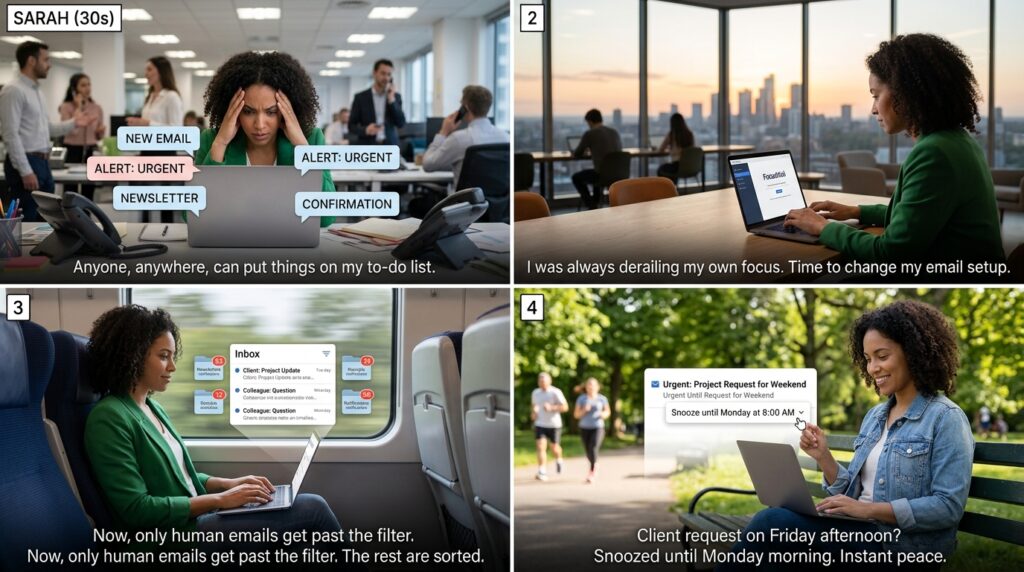
Email is the absolute bane of productivity. It is fundamentally a system where anyone in the world can place an item on your to-do list without your permission.
I used to leave my inbox open in a browser tab all day. Every time a new email pinged, I would stop what I was doing to check it. I was constantly derailing my own focus.
I switched to a specialized third-party email client. This app doesn’t just display my emails; it intelligently sorts them.
It automatically filters out newsletters, receipts, and low-priority notifications into separate folders that do not trigger notifications. Only emails from actual humans, or emails marked urgent, are allowed to ping my desktop.
Furthermore, it has a “Snooze” feature. If a client emails me on a Friday afternoon with a request that isn’t urgent, I don’t leave it in my inbox to cause me anxiety over the weekend. I hit “Snooze until Monday at 8:00 AM.” The email vanishes from my inbox and magically reappears exactly when I am ready to handle it.
Final Thoughts on Building Your Stack
When I look back at that exhausted, burnt-out version of myself staring at forty-two browser tabs, I don’t feel pity. I just feel relief that I finally figured out a better way.
The most important lesson I learned is that you cannot rely on your brain to hold the entire architecture of your professional life. Your brain is a terrible office manager. It forgets things, it gets easily distracted, and it relies heavily on emotions rather than logic.
Your brain is designed to generate ideas, not to store and manage them.
By offloading the administrative burden to these 9 apps, I freed up an incredible amount of mental RAM. I don’t have to remember my schedule, I don’t have to fight distractions, and I don’t have to manually format data. The software does the heavy lifting.
If you want to change your work life, do not try to download all nine of these apps today. That will only lead to more overwhelm. Pick the single biggest point of friction in your current day. Is it managing tasks? Is it staying focused? Is it scheduling?
Find the app that solves that one specific problem. Install it, learn it, and trust it. Once that single system is running smoothly, add the next one. Slowly, deliberately, you will build a digital ecosystem that doesn’t just manage your work, but actually empowers you to do the best work of your life.
