
If a friend walked into my apartment a few years ago, they would have commended me on my minimalism. The countertops were clear, the floors were vacuumed, and my bookshelves were impeccably organized. I took immense pride in keeping a tidy physical environment.
But if that same friend had looked over my shoulder and glanced at my laptop screen or unlocked my smartphone, they would have been horrified.
I was a severe, unapologetic digital hoarder.
My computer desktop was a sprawling, chaotic graveyard of randomly named files, ancient screenshots, and folders vaguely labeled “To Sort Later” that hadn’t been opened since 2018. My phone was a constant source of anxiety, frequently flashing the dreaded “Storage Almost Full” warning right when I was trying to capture a special moment. I had over twenty thousand unread emails, a toxic mix of vital client communications buried under a suffocating avalanche of promotional newsletters and expired coupon codes.
We often talk extensively about the psychological weight of physical clutter. We watch reality shows about organizing closets and throwing away old clothes. But we rarely acknowledge the silent, suffocating anxiety of digital clutter.
Every time I opened my laptop, I felt a low-grade spike of cortisol. Finding a simple tax document from the previous year required a thirty-minute archaeological dig through my hard drive. I was constantly dropping the ball on projects, losing important links, and forgetting passwords. My devices, which were engineered to make my life easier and more efficient, had become sources of immense daily friction.
I finally hit my breaking point when my browser crashed during an important video call because I had seventy-two tabs open simultaneously. I decided right then and there to stop treating my digital space like a junk drawer. I went on a massive software purge, deleting the bloatware and testing dedicated organizational tools until I built a streamlined, functional digital ecosystem.
If your screens are giving you a headache and your hard drives are glowing red, you don’t need to throw your phone in the river and move to the woods. You just need better infrastructure. Here are the 10 apps that helped me finally organize my digital life and reclaim my peace of mind.
1. Google Photos: The Infinite Memory Sorter
Nothing eats up digital space faster than a poorly managed camera roll. I am guilty of taking twenty burst-mode photos of my dog doing something cute, and then never going back to delete the nineteen blurry outtakes.
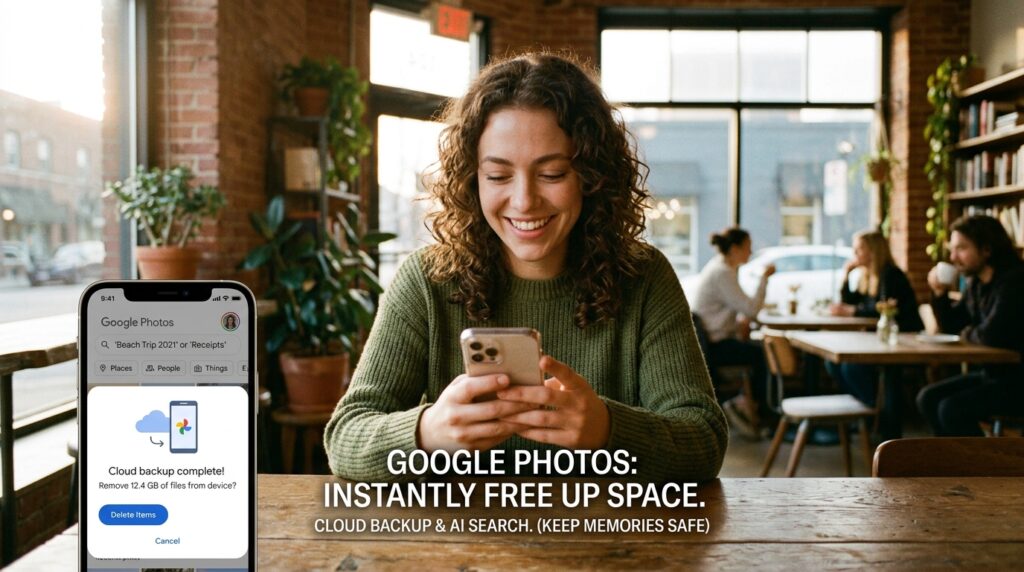
My local phone storage was constantly maxed out, which made me anxious about losing my memories if I ever dropped my device in the ocean. I transitioned my entire library to Google Photos, and it felt like a massive weight was lifted off my shoulders.
The immediate benefit was the “Free Up Space” button, which safely backed up my photos to the cloud and instantly wiped gigabytes of duplicate files off my physical phone. This kind of redundancy is critical, a concept I explored deeply in my breakdown of (12 Photo Storage Apps That Keep My Memories Safe).
But the true decluttering magic of Google Photos is its search function. It uses AI to automatically categorize your life. If I need a picture of a receipt I took three years ago, I don’t have to scroll through thousands of thumbnails. I just type “Receipt” into the search bar. It turned a messy digital shoebox into a perfectly indexed, searchable library.
2. Clean Email: The Inbox Sweeper
An overflowing email inbox is the digital equivalent of having thousands of unopened envelopes piled up on your living room floor. It is paralyzing.
I had 20,000 unread emails. The thought of deleting them one by one manually made my stomach turn; it would have taken weeks. I connected my account to Clean Email, and it felt like hiring a team of ruthless professional organizers.
The app analyzes your inbox and groups similar emails together into “Smart Views.” It immediately identified that 12,000 of my emails were from promotional mailing lists, outdated social media notifications, and automated alerts. With two clicks, I deleted them all simultaneously.
Then, I used the app’s “Auto-Clean” rules. Now, whenever a promotional email comes in from a store I buy from occasionally, it bypasses my inbox entirely and goes into a “Read Later” folder. My actual inbox is now a quiet, highly organized space reserved exclusively for real human beings. If you struggle with the daily avalanche of messages, combining a cleaner app with solid manual strategies is vital, something I cover in (Gmail Tips That Save Me Hours Every Month).
3. 1Password: The Mental Unburdening
Let’s talk about a different kind of clutter: password fatigue.
Before I got organized, my password system was a massive cognitive burden and a terrible security liability. I used the exact same password, with slight variations, for every single website. When a site forced me to change it, I would write the new password on a sticky note, lose the sticky note, and inevitably have to go through the frustrating “Forgot Password” email loop the next time I tried to log in.
Downloading 1Password changed my digital life overnight. It is an encrypted vault that stores every single login I possess. Now, I only have to remember one single, highly secure “Master Password.”
When I go to a website or open an app, 1Password automatically recognizes the site, generates a completely random, unhackable 20-character password, saves it, and autofills it. I never have to remember a password again. It removed an enormous amount of daily friction and decluttered my brain.
4. Pocket: The Browser Tab Savior
I used to suffer from severe “Tab Hoarding.” I would read an article online, see a link to another interesting article, open it in a new tab, and leave it there “just in case” I wanted to read it later.
By the end of the week, my browser would be crawling at a snail’s pace, groaning under the weight of fifty open tabs. It made my computer slow and my workspace visually overwhelming.
Pocket acts as a digital reading queue. Now, when I see a 3,000-word article about history or technology that I don’t have time to read right then, I simply click the Pocket extension on my browser. The app strips away all the distracting ads and saves the text cleanly to my account. I can then close the tab with zero guilt. On Sunday mornings, I open the Pocket app on my tablet and enjoy all the articles I saved throughout the week in a beautiful, distraction-free environment.
5. Notion: The App Consolidator
A major source of digital clutter is simply having too many apps that do the same thing. I had grocery lists in Apple Notes, blog post drafts in Google Docs, project outlines in Evernote, and random ideas scribbled in the margins of physical planners. I never knew where anything lived.
Notion allowed me to delete half the productivity apps on my phone.
It is a blank digital canvas that allows you to build your own personalized databases. I moved my entire life into this one application. I created a master dashboard. On that single screen, I have a Kanban board for my work projects, a database for my personal reading list, and a calendar for my upcoming deadlines. When everything lives in one unified, searchable workspace, you stop losing your brilliant ideas to the digital void.
6. Todoist: The Cognitive Offloader
Trying to remember all of your tasks is a terrible use of your brain power. Your brain is meant to generate ideas, not act as a hard drive. When you try to remember everything, your thoughts become cluttered and anxious.
Todoist became my external hard drive for obligations. It is a deceptively simple task manager that uses natural language processing. If I am on a phone call and realize I need to send an invoice next Tuesday, I open Todoist and type “Send invoice to client next Tuesday at 9 AM.”
The app automatically parses the date and time, schedules the task, and gets it out of my head. I never have to worry about forgetting a deadline again. This act of “brain dumping” is a cornerstone of mental clarity, a philosophy I break down further in (How a Simple To-Do App Made My Life Less Stressful). When I wake up, I just open the app, look at the “Today” view, and execute the list.

7. Google Drive for Desktop: The File Streamer
The absolute worst habit in the digital world is saving files directly to your computer’s “Desktop” folder. It creates a horrific visual mess every time you wake your computer from sleep.
I installed the Google Drive desktop application, which completely changed how I handle files. It integrates directly into my computer’s native file explorer.
Now, when I save a document, I save it directly into my highly organized Google Drive folders. The file lives in the cloud but is accessible on my computer exactly as if it were a local file. This means my physical desktop is completely blank. I can actually see my wallpaper now. It also means that if my laptop were to suddenly break, I wouldn’t lose a single document.
8. CleanMyMac X (or Files by Google): The Junk Sweeper
Over time, computers and phones accumulate a massive amount of invisible digital garbage. Cache files, broken downloads, massive DMG installers, and residual files from deleted apps sit in the background, quietly eating up your storage and slowing down your processing speed.
I use CleanMyMac X (and Files by Google for my mobile device) to automate the deep cleaning process.
Once a month, I run a smart scan. The app digs deep into my system folders and identifies all the useless junk that I would never be able to find manually. With one click, I routinely clear out 10 to 15 gigabytes of digital dead weight. It keeps my machines running as smoothly as the day I bought them and entirely prevents those stressful “Disk Space Full” pop-ups.
9. Toby: The Workspace Organizer
Even with Pocket handling my reading list, there are times when I genuinely need to have specific tabs open for work. If I am researching a project, I might need five specific websites, a spreadsheet, and a client portal open simultaneously.
Toby is a browser extension that allows you to save and organize entire collections of tabs into visual “Workspaces.”
If I am working on a marketing campaign, I can save all the relevant tabs into a Toby collection named “Marketing Q3.” When I am done working on it for the day, I close the tabs. The next morning, I just click that collection in Toby, and it instantly opens all those specific tabs in one go. It keeps my browser clean and allows me to pick up right where I left off without having to hunt down URLs in my history.
10. Feedly: The Feed Aggregator
My final source of digital clutter was information overload. I had news apps, blog subscriptions, and social media feeds constantly bombarding me with articles. I was opening ten different websites a day just to stay updated on my industry.
I deleted all the individual news apps and downloaded Feedly.
Feedly is an RSS aggregator. You plug in your favorite websites, blogs, and news sources, and Feedly pulls all of their newly published articles into one clean, unified, minimalist feed. There are no algorithmic suggestions, no pop-up ads, and no infinite scroll of unrelated content. It turns the chaotic noise of the internet into a quiet, curated digital newspaper that I can read on my own terms.
Final Thoughts on Digital Minimalism
Organizing your digital space is not a one-time, weekend project; it is an ongoing daily practice. Just like you have to wash the dishes and wipe down the counters in your physical kitchen, you have to maintain the hygiene of your digital home.
However, the return on investment for doing this work is absolutely staggering.
When you eliminate the digital friction—when you know exactly where your files are, when your passwords auto-fill flawlessly, when your inbox is quiet, and your photos are safely archived—you experience a profound sense of mental lightness. Your devices stop feeling like chaotic, demanding slot machines and start functioning like the powerful, streamlined tools they were originally engineered to be.
If you are feeling overwhelmed right now, please don’t try to fix everything today. Do not download all ten of these apps at once. Just pick one area of friction. Start by locking down your passwords, or start by archiving your old emails. Take one single step toward reclaiming your screens, and I promise you will feel the stress begin to lift immediately.
