
For years, the smoke alarm in my apartment was essentially my dinner bell.
If you had asked me a couple of years ago what my signature dish was, I would have confidently answered, “Scrambled eggs and a side of mild panic.” My relationship with my kitchen was deeply dysfunctional. I viewed my stove not as a tool for creating nourishment, but as a complicated, dangerous machine that was constantly judging my lack of culinary intuition.
I was the kind of person who would walk into a beautiful, fully stocked grocery store, stare blankly at the vibrant produce section for twenty minutes, panic, and walk out with a frozen pizza and a box of cereal.
I simply didn’t understand how people cooked. I didn’t understand how someone could look at a raw onion, a chicken breast, and some random spices and magically transform them into a cohesive, delicious meal that didn’t taste like burnt rubber.
Because of this intense kitchen anxiety, I fell into what I call the “Takeout Trap.” Every evening around 6:00 PM, I would open my fridge, stare at the sad, wilting spinach I had optimistically purchased three days prior, shut the door in defeat, and open a food delivery app on my phone.
The Financial and Physical Toll of the Takeout Trap
Relying on food delivery isn’t just bad for your physical health; it is absolutely catastrophic for your bank account.
I’ve written before about my journey getting my budget under control in my guide on 11 Finance Apps That Helped Me Save Money This Year, and frankly, the biggest leak in my financial bucket was my inability to feed myself. When you are paying a restaurant markup, plus a delivery fee, plus a service fee, plus a driver tip just to eat a mediocre pad thai on your couch, you are hemorrhaging money.
Beyond the financial drain, I just felt sluggish. I was consuming a massive amount of hidden sodium and cooking oils that I had no control over.
I knew I needed to learn how to cook. But every time I tried to start, I ran into the exact same infuriating roadblock: the modern recipe blog.

The Exhaustion of the Modern Recipe Internet
Let me be clear: I respect food bloggers. They work incredibly hard to develop recipes and photograph them beautifully. But as a stressed, hungry amateur cook trying to figure out how to roast a potato on a Tuesday night, the modern food internet is a nightmare.
I would search for “easy roasted potatoes.” I would click on a promising link. And then, the scrolling would begin.
First, I had to scroll past a five-paragraph story about the author’s childhood trips to their grandmother’s farm in Tuscany. Then, I had to scroll past fifteen high-resolution photos of raw potatoes from slightly different angles. Then, an autoplay video advertisement would hijack my screen, loudly playing a commercial for car insurance.
By the time I finally found the actual ingredient list hidden at the very bottom of the page, my screen would lock and go dark. With hands covered in olive oil, I would have to aggressively wipe my fingers on a paper towel, unlock my phone, find the browser tab again, and try to remember if it said one teaspoon of salt or one tablespoon.
It was a miserable, high-friction user experience. Cooking felt like a stressful scavenger hunt.
Enter the Digital Sous-Chef
I realized that my problem wasn’t a lack of cooking ability. My problem was a lack of a usable system. I needed something that stripped away the noise and just gave me the instructions clearly, calmly, and efficiently.
That is when I discovered a dedicated recipe management and cooking application that entirely changed the trajectory of my domestic life. (For the sake of this review, I am talking about apps like Paprika or Copy Me That, which focus on recipe aggregation and meal planning rather than just providing a static library of content).
When I first opened the app, it was basically an empty shell. It didn’t force-feed me trendy recipes. It didn’t have ads. It was simply a highly organized, digital filing cabinet waiting for me to fill it.
The Magic of the Web Importer
The feature that instantly made me fall in love with this app was its built-in browser and recipe importer. This single tool completely neutralized my hatred of recipe blogs.
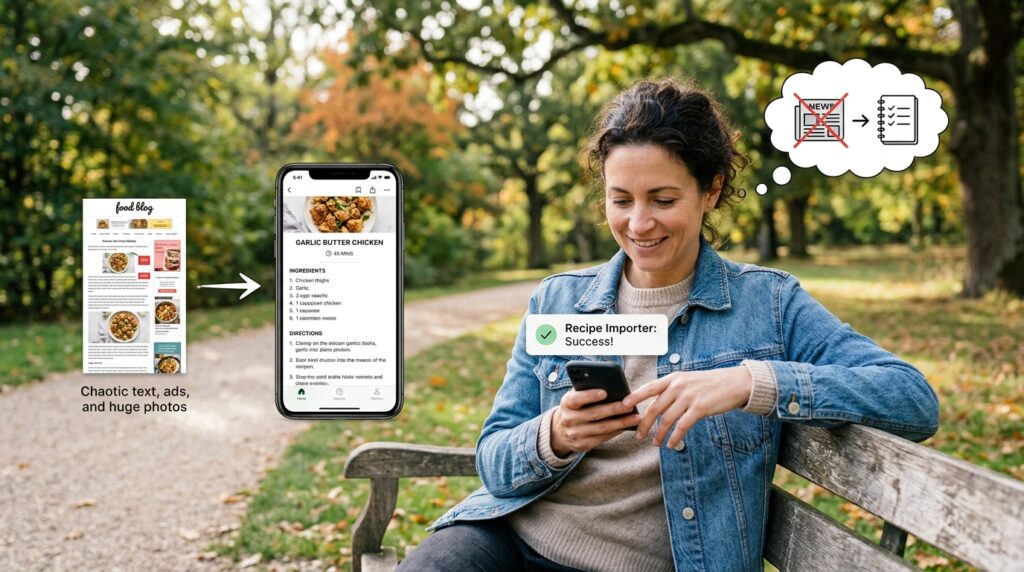
Here is how it works: I still use Google to search for recipes. But when I find a blog post for “Garlic Butter Chicken” that looks good, I don’t read the whole page. I tap the “Share” button on my phone and send the link directly to my cooking app.
In about two seconds, the app uses an algorithm to scan the webpage, ignore the thousands of words of backstory, ignore the pop-up ads, ignore the giant photos, and surgically extract only the essential data.
It pulls the title, the cooking time, the exact ingredient list, and the step-by-step directions. It neatly reformats all of this information into a clean, minimalist, standardized digital recipe card inside my app.
The relief I felt the first time I used this feature was profound. Suddenly, I was building my own personalized, highly curated digital cookbook, completely free of internet clutter. This was a massive step in my quest to streamline my life, which I detailed deeply in How I Automated My Daily Tasks With Mobile Apps. Automating the recipe collection process gave me my sanity back.
The Dynamic Grocery List Revolution
Having a clean list of recipes was a great start, but the app’s true genius revealed itself when I actually had to go to the grocery store.
In the past, meal planning involved me sitting at my kitchen table with three different cookbooks open, writing down ingredients on a scrap of paper, and inevitably realizing at the store that I forgot to check if I already had cumin in the pantry.
With this app, meal planning takes exactly three minutes.
On Sunday morning, I open the app and tap on the meals I want to eat this week. Let’s say I choose a chicken stir-fry for Monday, a pasta dish for Wednesday, and a beef stew for Friday.
I select those three recipes and tap “Add to Grocery List.”
The app doesn’t just copy and paste the ingredients. It acts like an intelligent assistant. It scans the three recipes, recognizes that both the stir-fry and the stew require onions, and consolidates them. Instead of having “1 onion” listed twice in two different places, it simply creates a single line item under the “Produce” category that says “2 onions.”
It sorts everything by grocery store aisle. All the produce is grouped together. All the dairy is grouped together.
When I walk into the supermarket, I don’t wander aimlessly anymore. I open the app, walk straight to the produce section, check off my consolidated vegetables, and move to the meat counter. It turned an anxiety-inducing, hour-long chore into a highly efficient, twenty-minute tactical strike.
The Screen Lock Savior
The actual act of cooking with this app is where it proves its worth as a true kitchen tool, rather than just a planning gimmick.
Remember my old nightmare of my phone screen constantly turning off while my hands were covered in raw chicken juice? This app has a simple toggle in the settings called “Keep Screen On.”
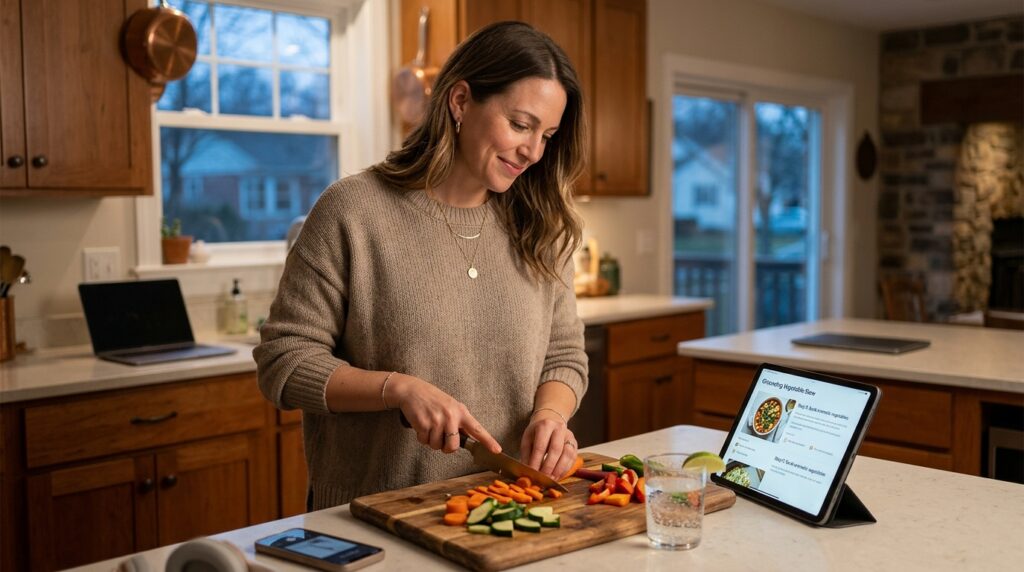
When I open a recipe in the app, my phone’s auto-lock feature is disabled. The screen stays brightly lit for the entire hour I am in the kitchen. I can place my phone on a small stand on the counter, and it acts exactly like a traditional, open cookbook.
Furthermore, the interface is interactive. When I add the two cups of flour to the bowl, I can tap that ingredient on the screen, and the app lightly crosses it out. When I finish step three of the directions, I tap it, and it highlights step four.
If you get distracted by a phone call or have to step away from the stove for a minute, you never lose your place. You just look at the screen, see exactly what is crossed off, and pick up right where you left off.
Built-in Timers That Actually Make Sense
Timing is everything in cooking. If you put the pasta in too early, it turns to mush before the sauce is ready.
Before this app, I would use the native clock app on my phone to set timers. But if I needed one timer for the oven and one timer for the boiling water, I would get confused about which alarm was for which item.
My cooking app handles this brilliantly. If a recipe step says, “Simmer the sauce for 15 minutes,” the app automatically highlights the “15 minutes” text in blue. If I tap that blue text, a tiny, unobtrusive timer drops down from the top of the screen and starts counting down.
I can have three different timers running simultaneously, all neatly labeled directly within the recipe interface. It acts as an incredible safety net for an amateur cook whose attention is easily divided.
The “Pantry Hero” Functionality
Perhaps the most universally dreaded question in any household is, “What are we doing for dinner tonight?”
There are days when my Sunday meal prep falls apart. Maybe a meeting ran late, or I just don’t have the energy to cook the complex meal I had originally planned.
This is where the app’s pantry search function acts as a lifesaver.
Let’s say I look in my fridge and see that I have half a bag of spinach, some leftover feta cheese, and a few sad-looking tomatoes. I simply type those three ingredients into the search bar of my app.
The app instantly searches my entire personal database of saved recipes and shows me only the dishes that utilize those specific ingredients. It rescues me from decision fatigue and dramatically reduces my food waste. Instead of throwing those wilting vegetables in the trash and ordering a pizza, I end up making a quick, delicious spinach and feta frittata that I had completely forgotten I knew how to make.
Building a Sustainable Evening Rhythm
Integrating this app into my daily life completely shifted how I view my evenings.
I used to dread the 6:00 PM transition. It was a source of stress. Now, it is a period of transition and decompression. If you’ve read my piece on How I Built a Productive Daily Routine Using Apps, you know I crave structure to keep my anxiety at bay.
This app provided that structure for my kitchen.
When I close my laptop at the end of the workday, I walk into the kitchen, open my app, and look at the recipe I planned on Sunday. The ingredients are already in the fridge because the automated grocery list worked perfectly. The instructions are clear and free of ads.
I put on a podcast, pour myself a glass of sparkling water, and follow the steps. I don’t have to think; I just have to execute. The act of chopping vegetables and stirring a simmering pot has transformed from a terrifying chore into a highly meditative, grounding practice.
The Real-World Results
It has been over a year since I committed to using this cooking app, and the results speak for themselves.
My takeout spending has plummeted by roughly eighty percent. I have entirely stopped throwing away rotten produce at the end of the week because I only buy exactly what the app tells me I need.
But the biggest change is my confidence.
I no longer view recipes as intimidating, unbreakable laws. Because I cook so frequently now, guided by a system that removes the friction, I have started to develop actual culinary intuition. I know when a sauce needs a little more acid. I know what a perfectly seared piece of fish looks like. I find myself actually tweaking the recipes in the app, leaving personal notes for my future self like, “Add double the garlic next time, trust me.”
I am not a professional chef, and I will probably never attempt to make a complicated French souffle. But I am finally a highly competent, self-sufficient home cook.
If you are currently trapped in the cycle of ordering expensive delivery food because your kitchen feels like a hostile environment, I urge you to stop looking for the perfect recipe blog and start looking for the perfect digital system.
Download a dedicated recipe manager. Start importing simple recipes. Let the software build your grocery list and guide you through the process without the distractions of the internet. You will be absolutely amazed at how quickly the panic fades, replaced by the deep, satisfying pride of sitting down to a delicious meal that you created with your own two hands.
