
For the first two years of my fitness journey, I used my smartphone like a glorified, overpriced notepad.
I would walk into the gym, open a highly sophisticated tracking app, and simply type “Bench Press: 3 sets of 10.” Then, I would close the app, listen to some music, and repeat the process for my next exercise. I was treating a powerful piece of algorithmic software as if it were a piece of loose-leaf paper.
I assumed that was all the app was meant to do. It was just a digital ledger to keep me from forgetting what I lifted the week before.
But one evening, while sitting on a gym bench waiting for a squat rack to open up, I accidentally swiped the wrong direction on my screen. A hidden menu slid into view. I tapped a button I had never noticed before, and suddenly, the app was doing complex math for me. I tapped another button, and it generated a 3D model of my body, showing me exactly which muscles were fatigued.
I sat there staring at my screen, feeling incredibly foolish.
The developers of these fitness apps have spent millions of dollars building tools to prevent injury, optimize your time, and eliminate the frustrating guesswork of training. But because we are always in a rush to get our workout done, we never actually explore the software. We just hit “Start Workout” and go.
If you are tired of hitting a plateau, feeling overwhelmed by your routine, or wasting time doing mental gymnastics on the gym floor, it is time to dig deeper into your digital tools. Here are the most powerful hidden features in fitness apps that I wish I knew about years earlier.
1. The Savior of Brain Fog: The Plate Calculator
Lifting heavy weights does something strange to your brain. When you are pushing your physical limits, your heart rate spikes, your blood rushes to your muscles, and your brain is temporarily starved of its usual oxygen supply.
In this state of “gym brain fog,” basic arithmetic becomes impossibly difficult.
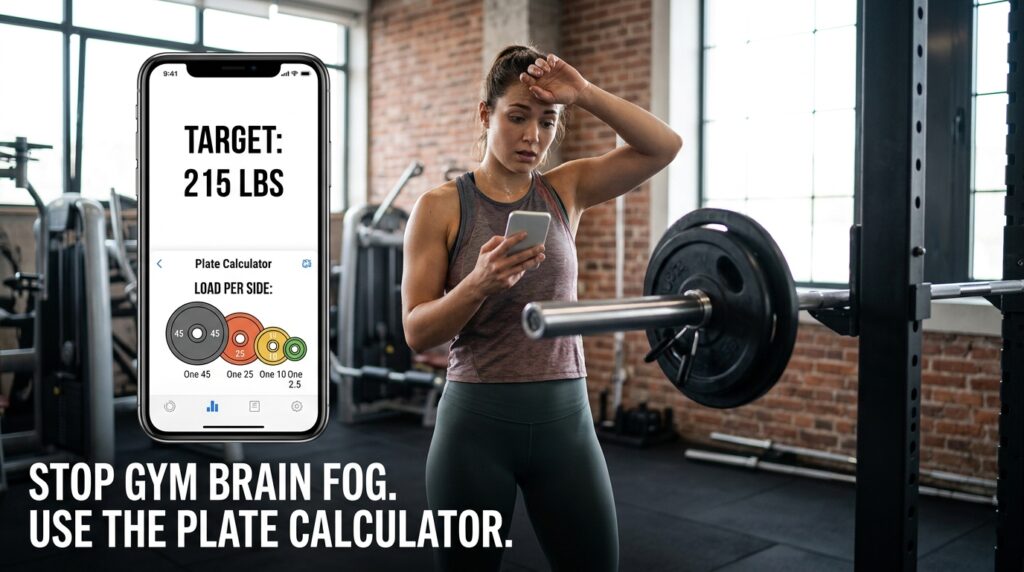
If my program told me to load 215 pounds onto a barbell, I would stand there staring blankly at the iron plates. Okay, the bar is 45 pounds. That leaves 170. Divide that by two, that’s 85 pounds per side. So I need a 45-pound plate… then a 25… then a 10… wait, is that right?
I have accidentally loaded lopsided barbells because of bad math, which is incredibly dangerous.
Almost every major tracking app (like Strong, Hevy, or Fitbod) has a hidden Plate Calculator.
When you type your target weight into the app, look for a tiny barbell icon next to the number. If you tap it, a visual graphic pops up on your screen. It literally draws a picture of the barbell and tells you exactly which plates to slide onto the sleeve: “One 45, one 25, one 10, one 2.5.”
You can even go into your global settings and tell the app exactly what plates your specific gym has available. If your gym doesn’t have 35-pound plates, the algorithm recalculates and gives you the correct combination using 25s and 10s. It completely eliminates the math and the danger.
2. Autoregulation via RPE (Rate of Perceived Exertion) Tracking
We like to think of ourselves as machines, but we aren’t.
Some days, you sleep for eight hours, eat a great meal, and lifting 135 pounds feels like lifting a feather. Other days, you are stressed from work, you slept terribly, and that exact same 135 pounds feels like a car engine.
For a long time, I forced myself to lift the heavier weights no matter how I felt, because “the app said I had to.” This led directly to burnout and joint pain.
Then I discovered the RPE (Rate of Perceived Exertion) toggle.
RPE is a scale from 1 to 10 that tracks how hard a set actually felt, rather than just the raw number of pounds lifted. An RPE of 10 means you couldn’t have done a single extra rep to save your life. An RPE of 8 means you had about two reps left in the tank.
Most tracking apps hide the RPE column by default to keep the interface looking clean. If you go into your workout settings, you can toggle it on.
Now, when I log my bench press, I don’t just log “135 lbs for 8 reps.” I log “135 lbs for 8 reps @ RPE 9.”
The next week, if I lift that same weight but log it as an RPE 7, the app’s algorithm knows I am getting stronger, even if the weight on the bar didn’t increase. Discovering this metric completely changed how I manage my energy, a shift in mindset I explored deeply when writing about Tips for Tracking Your Fitness Without Feeling Overwhelmed. It allows you to train intensely without destroying your central nervous system.
3. The “Crowded Gym” Lifesaver: Muscle-Targeted Swaps
There is nothing more infuriating than walking into the gym on a Monday evening to do your perfectly planned leg workout, only to find a line of three people waiting for the leg press machine.
In the past, I would either stand there awkwardly for twenty minutes wasting my precious time, or I would just skip the exercise entirely, leaving a massive gap in my training program.
I didn’t realize my fitness app had an built-in contingency plan.
When you are looking at your workout list in the app, you can usually swipe left or tap the three dots next to an exercise. This opens a hidden menu with an “Alternative Exercises” or “Swap” feature.
If I tap “Swap” on the Leg Press, the app immediately searches its massive database and presents me with a curated list of exercises that target the exact same quadricep and glute muscles. It suggests Bulgarian Split Squats, Goblet Squats, or Walking Lunges.
I can grab a dumbbell, walk to an empty corner of the gym, and get the exact same biological stimulus without waiting for the machine. The app even swaps the exercise smoothly into my current log so my tracking history remains perfectly accurate.
4. Customizing the Auto-Rest Timers
When you finish logging a set in most modern fitness apps, a little countdown timer automatically pops up at the top of your screen.
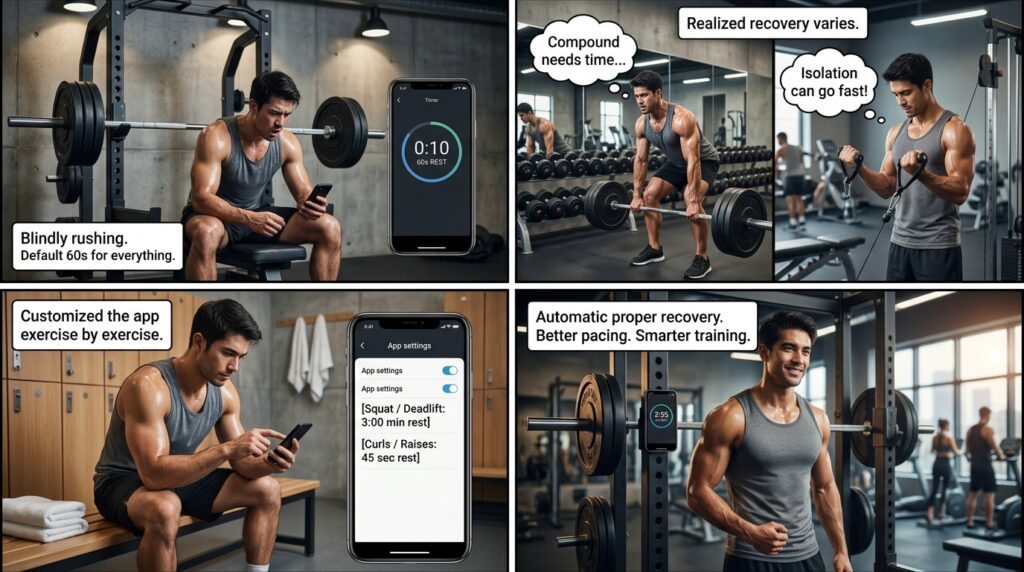
By default, this timer is almost always set to 60 seconds. For my first year of training, I blindly followed this timer. I would finish a heavy, exhausting set of barbell squats, stare at the clock ticking down from 60, and rush back under the heavy bar while I was still gasping for air. My performance suffered terribly.
Not all exercises require the same amount of rest. Your cardiovascular system and your ATP (cellular energy) reserves need different recovery times depending on the movement.
If you dig into your app’s exercise database, you can actually set custom, exercise-specific rest timers.
I opened the settings for my compound lifts (Squats, Deadlifts, Bench Press) and permanently changed their default rest timers to 3 minutes. Then, I opened the settings for my smaller isolation movements (Bicep Curls, Calf Raises) and set them to 45 seconds.
Now, when I check off a set of squats, the app automatically gives me the three minutes I biologically need to recover my strength. But when I move to arm isolation, it keeps the pace fast and intense. I don’t have to manually adjust the clock every single time. It completely streamlines the pacing of my entire workout.
5. The 3D Muscle Recovery Heatmap
Overtraining is the silent killer of progress. If you work out your chest on Monday, and it is still deeply sore on Wednesday, you should not be doing pushups. You are just tearing down muscle tissue that hasn’t had the chance to rebuild yet.
However, keeping track of exactly which muscles are fully recovered, slightly fatigued, or completely exhausted is difficult, especially if you run a complex training split.
Many of the top-tier algorithmic apps feature a hidden Recovery Heatmap.
This feature acts as a visual dashboard for your physical body. When I open the “Muscle Recovery” tab, I am presented with an anatomical, 3D model of a human. The muscles I haven’t trained recently are glowing bright green (100% recovered). The muscles I trained lightly yesterday might be yellow (60% recovered). And the hamstrings I destroyed during yesterday’s leg day are glowing deep red (10% recovered).
This visual representation is incredibly powerful. Finding this specific feature was the exact reason I finally settled on my current software stack, an ongoing experiment I chronicled in I Tried 5 Fitness Apps — Only One Kept Me Motivated. If I walk into the gym intending to train my back, but my heatmap shows my lats are still glowing red, I immediately pivot and train shoulders instead. It prevents injury by letting the data guide the decision.
6. Invisible Health Ecosystem Syncing
We tend to treat our fitness apps as isolated silos. The gym app tracks the weights, the smartwatch tracks the steps, and the health app tracks the sleep.
But your body doesn’t operate in silos. A heavy lifting session is directly impacted by how well you slept the night before and how many steps you took that day.
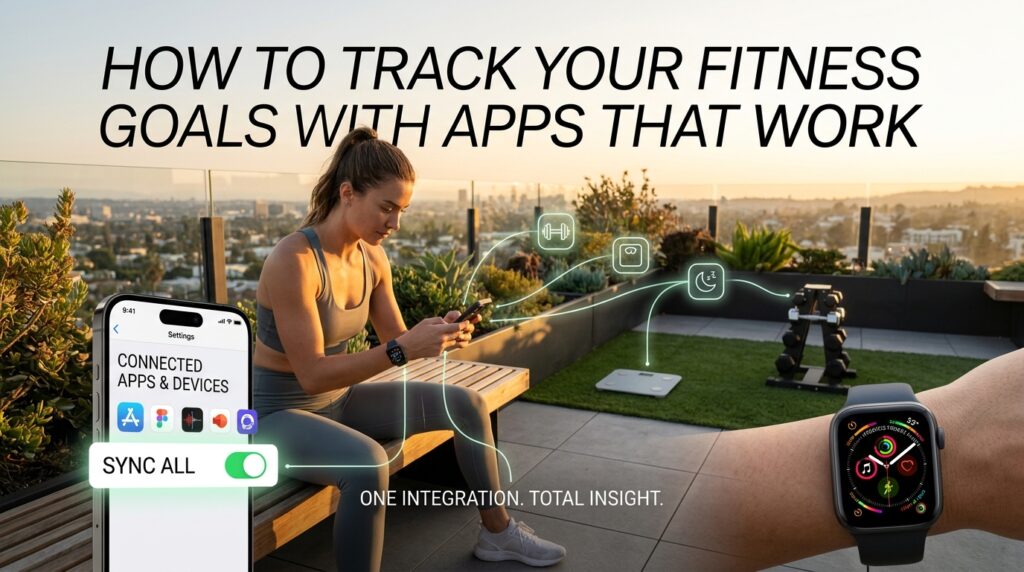
If you go into the global settings of your fitness app, look for the “Integrations” or “Connected Apps” menu.
You need to authorize the app to read and write data to your central health ecosystem (like Apple Health or Google Fit). Once I flipped this invisible switch, the magic happened in the background.
My lifting app started pulling my bodyweight data directly from my smart scale, ensuring my calorie burn estimates were always mathematically accurate. Furthermore, the lifting app started pushing my exact muscular exertion data back to my Apple Health rings, finally giving me accurate credit for the brutal hour of strength training I just completed. Connecting these fragmented tools is the ultimate secret to holistic health management, a philosophy I break down completely in How to Track Your Fitness Goals With Apps That Work. You want your apps talking to each other so you have one single, unified picture of your health.
Final Thoughts: Sharpening the Axe
There is an old quote that says, “If I had eight hours to chop down a tree, I would spend the first six hours sharpening my axe.”
Walking into the gym and just wildly throwing weights around is the equivalent of swinging a dull axe. You will sweat, you will get tired, and you will feel like you worked hard, but you won’t actually make efficient progress.
Your smartphone is the ultimate whetstone. The developers have packed these apps with plate calculators, biological recovery maps, intelligent rest timers, and injury-prevention algorithms. But they don’t force you to use them. They hide them in the settings menus, waiting for you to care enough to find them.
Take ten minutes tonight while you are sitting on the couch to open your fitness app. Tap every icon. Swipe on every menu. Find the plate calculator. Turn on the RPE tracking. Adjust your rest timers.
When you unlock the true architecture of the software, the app stops being a passive digital notepad. It transforms into a highly intelligent, algorithmic personal trainer sitting right there in your pocket, ready to guide you to the strongest version of yourself.
