
There is a very specific type of exhaustion that only occurs under the flickering fluorescent lights of a supermarket on a Sunday afternoon.
You walk through the automatic sliding doors with a vague, optimistic idea of buying “groceries for the week.” But forty-five minutes later, you are standing in the middle of aisle six, staring blankly at a wall of seventeen different types of olive oil, completely paralyzed by decision fatigue. Your cart has three bags of chips, a random assortment of vegetables you don’t know how to cook, and absolutely nothing that resembles a cohesive dinner.
Worse yet, you inevitably reach the checkout counter, pay a painful amount of money, drive all the way home, and realize the very second you walk into your kitchen that you forgot to buy milk.
For the first few years of my independent adult life, this chaotic ritual was my weekly reality. I was relying on scribbled notes on the back of receipts that I would inevitably leave on the kitchen counter. I was double-buying spices I already had, forgetting the essentials, and wasting an enormous amount of money on impulse purchases simply because I was shopping hungry and without a strategy.
I realized that the supermarket is a highly engineered environment designed to make you wander aimlessly and spend more money. To combat it, I needed a highly engineered defense system.
I’ve discussed how digital tools elevate my kitchen skills in my post about (The Cooking App That Turned Me Into a Better Home Chef), but the truth is, a great meal actually starts in the produce aisle. I completely overhauled my approach, treating my smartphone as my ultimate shopping companion.
If you want to reclaim your Sunday afternoons, stop throwing away rotten produce, and cut your grocery bill down to size, here are 9 mobile apps that will make your shopping trips infinitely faster and easier.
1. AnyList: The Real-Time Synchronization Lifesaver
The absolute fastest way to start an argument in my household used to be the grocery list. Someone would write “apples” on a whiteboard on Tuesday. By Friday, when I actually went to the store, someone else had erased it to write something else, or I simply forgot to take a picture of the board before I left.
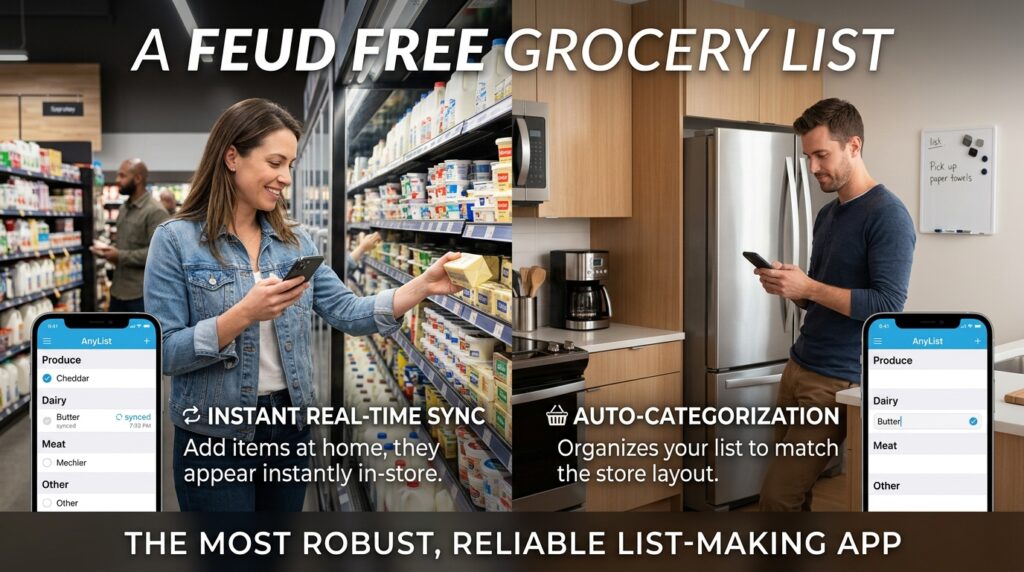
AnyList completely eradicated this friction. It is, without a doubt, the most robust, reliable list-making app I have ever used.
Its superpower is instant, real-time synchronization. My partner and I share a master grocery list account. If I am physically standing in the dairy aisle at the supermarket, and my partner is at home and realizes we are out of butter, they can add it to the app from their phone. It pops up on my screen instantly.
Furthermore, AnyList automatically categorizes your items. If I type “Chicken, Apples, and Cheddar,” it doesn’t just make a dumb list. It automatically drops Chicken into the “Meat” section, Apples into “Produce,” and Cheddar into “Dairy.” It organizes my list to match the physical layout of the store, so I never have to backtrack from aisle ten all the way back to aisle one.
2. Mealime: Eliminating the Dinner Panic
Shopping without a meal plan is like going on a road trip without a map; you are going to end up somewhere you don’t want to be, and it’s going to cost you a lot of gas money.
Mealime bridged the massive gap between deciding what to eat and actually buying the ingredients.
Every Thursday evening, I sit on my couch and open the app. It presents me with a massive, beautifully photographed catalog of healthy, thirty-minute recipes. I tap the four meals I want to eat next week.
Instantly—without me having to do any math—Mealime generates a precise grocery list. If two different recipes call for half an onion, it consolidates them and tells me to buy exactly one onion. It takes the heavy cognitive load of meal planning and compresses it into a two-minute task, ensuring I walk into the store with a strict, unyielding mission.
3. Flipp: The Modern Coupon Clipper
Sticking to a grocery budget is a massive part of financial stability, a concept I broke down when exploring (How to Budget Your Money With a Finance App). But let’s be honest: nobody has the time or the patience to sit at a kitchen table with a pair of scissors, clipping physical coupons out of the Sunday newspaper.
Flipp took that entire archaic industry and modernized it.
This app aggregates every single weekly circular and sales flyer for the grocery stores, pharmacies, and big-box retailers in your specific zip code.
Instead of flipping through paper, I use the search bar. If I know I want to make chicken breast this week, I simply type “Chicken Breast” into Flipp. It instantly scans every store in a five-mile radius and shows me exactly who has it on sale for the lowest price per pound. I can digitally “clip” the deal right inside the app. It allows me to build my shopping list around what is currently heavily discounted, saving me hundreds of dollars a year on meat and produce alone.
4. Out of Milk: The Pantry Inventory Manager
Have you ever stood in the baking aisle, staring at a jar of cumin, trying to mentally visualize the inside of your spice cabinet to figure out if you have any left at home?
I used to play this guessing game constantly. I usually guessed wrong, which is why I once owned four distinct, completely full jars of ground cinnamon.
Out of Milk solves this by operating as both a shopping list and a pantry inventory manager. When I unpack my groceries, I spend two minutes logging the non-perishables and spices into my “Pantry” list on the app. When I use the last drop of olive oil, I tap a button, and it instantly moves the olive oil from my “Pantry” list over to my “Shopping” list.
It completely removes the guesswork. When I am at the store, I have a literal, digital map of exactly what is currently sitting in my kitchen cabinets.
5. Paprika Recipe Manager 3: The Blog Bypass
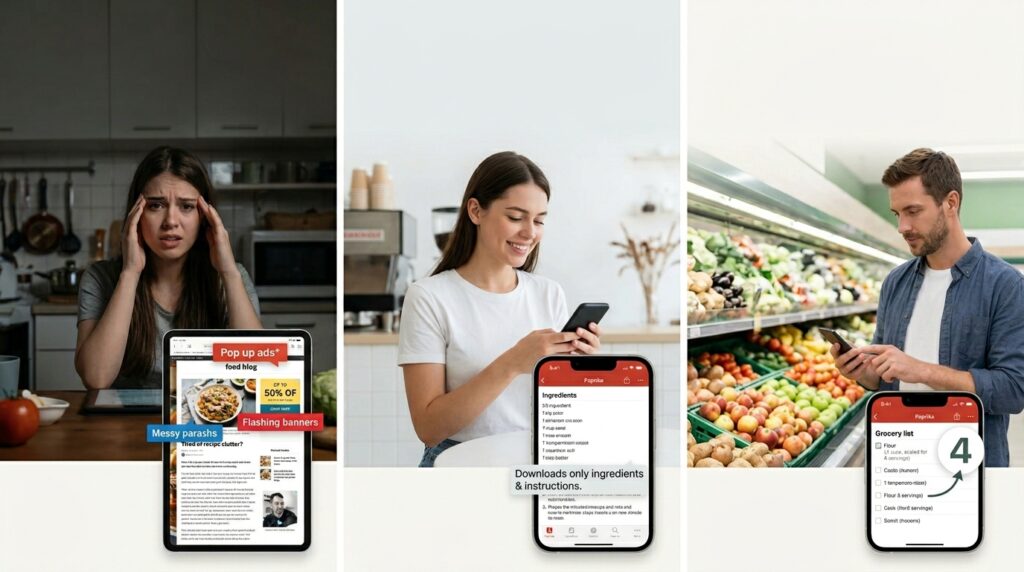
I love finding new recipes on food blogs, but the user experience of reading those blogs is famously terrible. You have to scroll past three thousand words about the author’s childhood vacation to Tuscany and fight through ten pop-up ads just to find out how much flour you need.
Paprika is a premium app, and it is worth every single penny. It features a built-in browser. When you find a recipe you like online, you tap the “Download” button. Paprika instantly strips away all the ads, all the personal stories, and all the clutter. It extracts only the ingredients and the instructions, saving them to a beautifully clean, permanent digital library.
From there, with one tap, it sends those exact ingredients straight to a smart grocery list. You can even scale the recipe—tell the app you want to make four servings instead of two, and it will mathematically adjust your grocery list for you before you hit the store.
6. Bring!: The Visual Organizer
Managing a household means managing a constant influx of requests, a challenge I tackled head-on in my guide on (How I Use Apps to Keep My Family Organized). When it comes to groceries, text-heavy lists can sometimes get overwhelming or confusing, especially if you are living with roommates or have kids who want to add things to the list.
Bring! takes a highly visual approach to the grocery run.
Instead of a spreadsheet of text, the interface uses clean, aesthetically pleasing icons. If you need bananas, you just tap the picture of the bananas. The icons turn red when they are added to the list and turn green when you tap them in the store to put them in your cart.
It sounds simple, but the visual cues actually make shopping much faster. You don’t have to read down a line of text; your eyes just scan the screen for the picture of the milk carton, and you grab it off the shelf. It is incredibly intuitive and makes the act of checking items off genuinely satisfying.
7. Instacart: The Tactical Time-Saver
I firmly believe that going to the grocery store yourself is usually the best way to pick high-quality produce and stick to a budget. However, there are weeks where life completely falls apart. You get sick, work demands overtime, or you are simply too exhausted to deal with a crowded parking lot.
On those days, Instacart is not a luxury; it is a tactical survival tool.
While the fees and markups are real, you have to weigh them against the value of your own time. If spending an extra fifteen dollars on delivery buys me two hours of rest on a Sunday afternoon, it is a highly profitable trade.
I keep my Instacart app loaded with a “Favorites” list of our absolute household staples—the specific brand of coffee we drink, the eggs, the bread. When I am having a chaotic week, I can open the app, tap “Reorder Favorites,” and have a fully stocked fridge delivered to my doorstep in under two hours without ever putting on shoes.
8. Fetch Rewards: Gamifying the Receipt
Your grocery shopping trip shouldn’t end the moment you put the bags in the trunk. There is value left on the table.
For years, I threw my paper receipts straight into the trash can on my way out the door. Now, I refuse to start my car until I have opened the Fetch app.
Fetch turns the mundane chore of buying toilet paper and ground beef into an arcade game. You just point your phone camera at your receipt and snap a photo. The app’s optical character recognition reads the receipt and instantly awards you points based on the brands you bought.
There is zero prep work required. You don’t have to pre-select offers or scan barcodes while you shop. You just upload the receipt afterward. I let these points accumulate silently in the background over the course of a few months, and then I cash them out for digital gift cards to Amazon or local coffee shops. It feels like getting free money as a reward for simply doing my chores.
9. SuperCook: The “Reverse” Shopping Trip
The ultimate way to make grocery shopping faster and easier is to completely cancel the trip.
There are countless evenings where I stare into my fridge, see half a bell pepper, some leftover chicken, and a jar of salsa, and convince myself that we have “nothing to eat” and I need to run to the store.
SuperCook is an absolute miracle app that stops me from making those unnecessary runs. It is a “reverse” recipe engine.
You open the app and input exactly what ingredients you currently have sitting in your kitchen. You tap “Chicken,” “Bell Pepper,” “Salsa,” and “Rice.” SuperCook immediately scours hundreds of recipe databases across the internet and presents you with a list of meals you can make right now, using only the items you already possess.
It completely destroys the illusion that you have no food. It forces you to get creative, reduces your household food waste, and keeps you out of the supermarket aisles when you don’t actually need to be there.
Final Thoughts on Reclaiming Your Time
We spend a shocking amount of our short, precious lives wandering through grocery aisles, debating which brand of peanut butter to buy, and standing in checkout lines.
It is a chore that we have to repeat every single week, for the rest of our lives. If you can shave just twenty minutes off that weekly trip by using better systems, you are buying back over seventeen hours of your life every single year.
You don’t need to surrender your weekends to the chaos of the supermarket. Stop relying on your memory and a scrap of paper. By turning your phone into a synchronized, optimized command center, you can walk through those automatic sliding doors with confidence, execute your plan with precision, and get back home to the things that actually matter.
