
For the majority of my professional life, Sunday evenings were a deeply unpleasant experience.
Right around 7:00 PM, a familiar, heavy feeling would settle in my chest. You probably know the feeling well. It is universally referred to as the “Sunday Scaries.” While the rest of my family was winding down, watching a movie, or preparing a nice dinner, I was sitting on the couch with my laptop open, staring into the abyss of the upcoming week.
My planning method back then was what I like to call “optimistic chaos.”
I would grab a yellow legal pad and start scribbling down everything I needed to accomplish by Friday. The list would grow to fifty or sixty items. I would write down massive projects (“Draft Q3 Marketing Strategy”) right next to trivial errands (“Buy almond milk”). I would look at this towering, impossible list, draw a messy box around Monday, and hope for the best.
When Monday morning actually arrived, I wouldn’t even look at the pad. I would immediately open my email inbox, and my entire day would be hijacked by other people’s emergencies. I was living in a constant state of reaction. I wasn’t running my week; my week was running me.
I realized that a simple piece of paper was never going to be enough to wrangle the complexities of modern, digital work. I needed a centralized command center.
After years of trial, error, and abandoned software subscriptions, I finally found a unified productivity app that completely cured my Sunday anxiety. It didn’t just change where I wrote my tasks down; it fundamentally transformed how I perceive and manage my own time.
The Flaw of the “Daily To-Do” Mindset
Before I explain the mechanics of the app that saved me, it is crucial to understand why my old method was failing.
When you plan your life day-by-day, you suffer from a severe lack of perspective. If I woke up on Tuesday and wrote a list of ten things to do, I was operating in a vacuum. I wasn’t considering that Thursday was completely booked with back-to-back meetings, meaning any leftover tasks from Tuesday would instantly create a bottleneck by the end of the week.
Planning daily makes you incredibly vulnerable to the “planning fallacy”—the human tendency to vastly underestimate how long a task will take.
I needed to zoom out. I needed a tool that forced me to look at the entire 168 hours of the week as a single, finite canvas. During my initial research into finding a better rhythm, I tested numerous platforms and documented my findings on Tools That Help Me Plan My Week Without Stress. The common denominator among the tools that actually worked was their ability to visualize time, not just list tasks.

Finding the Ultimate Aggregator
The app I finally settled on (a unified digital planner that combines task management with calendar integration) acts as an aggregator for my entire digital existence.
Here is the brilliant reality of modern work: your tasks do not live in one place. You have emails that require action. You have Slack or Teams messages from your boss asking for a quick favor. You have project management boards like Trello or Asana where your team assigns you tickets.
In the past, I had to keep six different browser tabs open just to figure out what I was supposed to be doing. I was constantly losing things in the cracks between different software platforms.
This app solved that by connecting to everything.
Now, when an urgent email comes in, I don’t leave it sitting in my inbox to rot. I click one button, and the app pulls the email out of Gmail and turns it into a concrete task in my master planning inbox. If a colleague tags me in a Slack channel, the app automatically generates a task.
It acts as a giant digital funnel, catching every single request, idea, and obligation, and dropping it into one single, manageable list.
Step One: The Friday Afternoon Brain Dump
My weekly planning ritual no longer happens on Sunday evening. The anxiety of Sunday was a direct result of carrying the baggage of the workweek into my weekend.
Now, my planning happens on Friday at 4:00 PM.
I close all my current work. I open my productivity app and look at my unified inbox. This inbox is a chaotic mess of everything I captured during the week but didn’t have time to complete.
I spend twenty minutes aggressively processing this list. I use the “Two-Minute Rule.” If a task in the inbox will take less than two minutes to complete (like paying a quick invoice or replying “Yes” to a meeting invite), I just do it right then and there. Get it off the screen.
For the rest of the tasks, I assign a realistic time estimate. This is crucial. If I have a task titled “Review legal contract,” I force myself to type “45m” next to it. The app requires me to confront the physical reality of how long work actually takes.
Step Two: The Tetris of Timeboxing
Once my inbox is processed and every task has a time estimate attached, the real magic of the app comes into play.
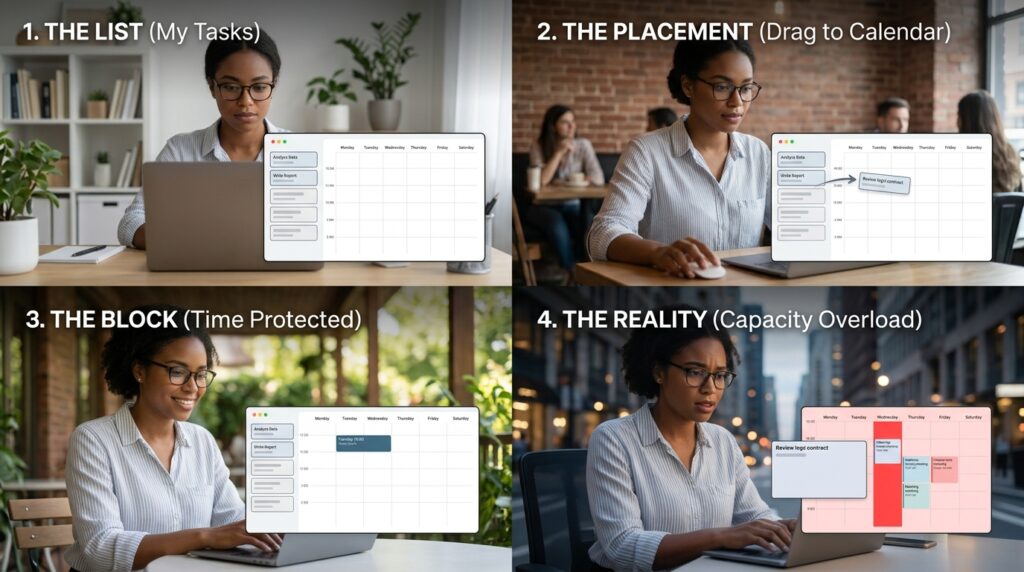
The app’s interface shows my list of tasks on the left side of the screen, and my upcoming week’s calendar (synced with my Google Calendar) on the right side.
I start dragging and dropping.
I grab the “Review legal contract” task and drag it onto the calendar for Tuesday at 10:00 AM. Because I estimated it would take 45 minutes, the app automatically blocks out a 45-minute chunk of time on my actual calendar. No one can book a meeting over it. That time is protected.
I continue dragging tasks from the list onto the calendar for Monday, Tuesday, Wednesday, Thursday, and Friday.
This process is affectionately known as “timeboxing,” and it is the single most effective way to eliminate overwhelm. When you drag tasks onto a calendar, you are playing a game of Tetris with your life. The calendar does not lie. It is an unyielding, visual representation of your capacity.
If I try to drag 12 hours’ worth of tasks onto a Wednesday that already has four hours of zoom meetings, the app physically won’t let me do it. The blocks overlap. The calendar turns red. It forces me to accept that I cannot bend the laws of physics. I have to either delegate a task, move it to next week, or say no to something.
Step Three: Protecting the Human Element
One of the biggest mistakes I used to make was treating my calendar strictly as a tool for corporate obligations. My calendar was full of client calls, project deadlines, and quarterly reviews.
But my personal life—my health, my relationships, my hobbies—was relegated to the scraps of time left over at the end of the day. And because work has a tendency to expand to fill whatever time you give it, there were rarely any scraps left.
I changed my philosophy, heavily influenced by my search for Tools That Help Me Organize Work and Personal Life Together. I realized that if a personal goal isn’t scheduled, it simply doesn’t exist.
Now, before I drag a single work task onto my weekly calendar, I schedule my life.
I drag a one-hour block onto the calendar for Monday, Wednesday, and Friday mornings and label it “Gym.” I drag a block onto Thursday evening and label it “Date Night.” I drag a block onto Sunday morning and label it “Read Fiction.”
By blocking this time first, I am paying myself before I pay my employer. When I start dragging my work tasks onto the calendar, I have to fit the professional work around my personal life, rather than the other way around.
The app treats my gym session with the exact same weight and visual priority as a meeting with my CEO. It is a profound psychological shift that completely cured my burnout.
Step Four: The Daily “Zen Mode”
By 5:00 PM on Friday, my entire upcoming week is perfectly laid out like a colorful mosaic. Every task has a designated day and time.
I shut my laptop. For the entire weekend, I do not think about work. The Sunday Scaries are entirely gone because I know my system is holding the plan. I don’t have to use my brain to remember anything.
When Monday morning arrives, the app performs its final, most important function: it hides the big picture.
If I opened my laptop on Monday and stared at the seventy tasks scheduled for the entire week, I would instantly panic. It would be too much cognitive overload.
Instead, the app has a “Daily Focus” view. When I turn it on, the rest of the week completely disappears. The interface dims, and all I see is exactly what is scheduled for today.
At 9:00 AM, the app shows me my first block. I hit a small “Start” button next to the task. A gentle timer begins running in the corner of my screen. The app silences my computer notifications.
For the next hour, I am not a project manager. I am not an overwhelmed employee. I am simply a person executing a single, predefined step.
This hyper-focus is incredible for getting deep work done. On days when my schedule is particularly brutal, having this level of tunnel vision is a lifesaver, a technique I often combine with the methods I outlined in How I Stay Focused During Long Workdays With Apps. You don’t need to conquer the whole week on a Monday morning; you just need to conquer the next hour.
The Agility to Roll With the Punches
Now, let’s be entirely realistic. No week ever goes exactly according to the plan you made on a Friday afternoon.
Emergencies happen. A client website crashes. A child gets sick and needs to be picked up from school. A massive, unexpected project drops onto your desk on a Wednesday morning.
In my old, paper-based system, a mid-week emergency would ruin everything. I would cross things out, draw frantic arrows, and ultimately just abandon the legal pad entirely.
A digital, calendar-based app is incredibly agile.
When that emergency hits on Wednesday, I don’t panic. I just grab the tasks that were scheduled for that afternoon and drag them over to Thursday. If Thursday is full, I drag them to Friday. If Friday is full, I move them to a designated “Backlog” folder for next week.
The system flexes and bends with the reality of my life. I am constantly renegotiating my schedule with myself in real-time. Moving a task isn’t a failure; it is active, engaged management of my own capacity.
The Power of the Weekly Review
The final piece of the weekly planning puzzle happens at the end of the week, right before I start planning the next one.
The app provides a beautifully designed analytics dashboard that shows me exactly how I spent my time.
It shows me that I planned to spend 15 hours on deep, creative work, but I actually spent 22 hours answering emails and sitting in status meetings.
This data is vital. It acts as an objective mirror. If I feel exhausted at the end of the week but feel like I haven’t accomplished anything meaningful, the analytics prove exactly why. It gives me the hard evidence I need to push back on my boss, decline unnecessary meetings, and protect my time more fiercely in the upcoming week.
It is one thing to feel like you are busy. It is entirely different to have a software program prove exactly where your hours are leaking away.

Final Thoughts on Reclaiming Your Time
Time is the only truly non-renewable resource we possess. You can always make more money, but you can never buy back a wasted Tuesday.
For years, I treated my time carelessly. I let my inbox dictate my priorities. I let other people’s emergencies hijack my schedule. I spent my weekends dreading the week ahead, and my weeks desperately waiting for the weekend.
Adopting a unified, calendar-based productivity app wasn’t just about getting more chores done. It wasn’t about turning myself into a hyper-efficient robot.
It was about intentionality.
It was about sitting down once a week, looking at the blank canvas of the upcoming 168 hours, and deciding exactly what kind of life I wanted to live.
If you are feeling overwhelmed, if you are waking up in the middle of the night stressed about missed deadlines, or if your Sundays are ruined by the shadow of Monday, I strongly urge you to abandon the endless, unprioritized to-do lists.
Find a tool that forces you to respect the physical limits of a 24-hour day. Pull all your loose tasks into one central hub. Estimate the time they take. Put them on a calendar. Protect your personal hours with the same ferocity you use to protect your professional deadlines.
When you trust your system to hold the complexities of your life, your brain is finally free to simply exist in the present moment. And that peace of mind is worth more than any productivity hack in the world.
