
Let me tell you about a recurring nightmare I used to have about two years ago. I would wake up in a cold sweat, absolutely convinced that I had accidentally posted a picture of my dog wearing a silly hat to a very serious corporate client’s LinkedIn page.
I would frantically fumble for my phone in the dark, my heart hammering against my ribs, just to check the feed and make sure my career hadn’t imploded while I was sleeping.
For a long time, this was my reality. Managing social media was no longer just a fun way to share updates with friends; it had become my primary source of income and my biggest source of daily anxiety.
I was managing my personal accounts, a growing side-hustle blog, and two different client profiles. That meant I had Twitter, Instagram, LinkedIn, and Facebook installed on my phone, and I was constantly logging in and out of different profiles.
My digital life was a chaotic, fragmented mess. I was dropping the ball constantly.
The Breaking Point: The Multi-App Circus
If you have ever tried to run multiple social profiles using the native applications, you know exactly what kind of circus I am talking about.
It feels like you are trying to spin a dozen fragile glass plates on sticks, and the moment you look away from one, it shatters on the floor.
I remember a specific Thursday afternoon sitting at a small cafe near Copacabana. I was supposed to be enjoying a rare day off. Instead, my phone was buzzing relentlessly. I had a client running a promotional campaign on Instagram, and a customer was asking a vital question in the comments.
But because I was currently logged into my personal account looking at a friend’s travel photos, I didn’t see the notification. By the time I switched accounts four hours later, the customer had already left an angry follow-up comment complaining about the lack of customer service.
I felt terrible. It wasn’t that I was lazy; the system I was using was fundamentally designed to make me fail.
Native social media apps are built for consumers, not creators or managers. They are designed to suck you into the algorithmic feed and keep you scrolling endlessly. They are not designed to help you execute professional tasks efficiently.
I realized that if I didn’t find a way to streamline my workflow, I was either going to lose my clients or completely lose my mind.

The Search for a Digital Command Center
I knew I needed a third-party tool. I needed a central hub.
My initial foray into social media management software was incredibly disappointing. I tried several of the major, enterprise-level platforms. While they were incredibly powerful, they were also clunky, outdated, and ridiculously expensive. They felt like they were built for massive marketing agencies with dedicated IT departments, not for a solo creator working from a laptop on their kitchen counter.
Furthermore, many of those heavy desktop applications had terrible mobile counterparts. If I was out running errands and needed to approve a post, the mobile app would constantly crash or fail to sync.
I needed something lightweight, reliable, and specifically optimized for a smartphone screen. After weeks of downloading, testing, and deleting various tools, I finally stumbled upon an app that actually understood how modern digital work flows.
When you juggle multiple online identities, discovering effective Tips for Managing Multiple Social Media Apps Efficiently becomes a matter of professional survival. This specific app didn’t just offer tips; it offered an entire structural overhaul of my day.
Feature #1: The Unified Inbox (My Absolute Savior)
If I had to pinpoint the single feature that makes this app completely un-deletable for me, it is the unified inbox.
Before this app, engaging with my audience was a disjointed nightmare. I would open Instagram, reply to five comments, switch to my client’s Instagram, reply to their DMs, close the app, open Twitter, check my mentions, open Facebook, check the brand page messages… it was exhausting.
Every time you open a native social media app, you run the risk of getting distracted by the timeline. I would go into Instagram to reply to a client question and emerge forty-five minutes later after falling down a rabbit hole of cooking videos.
The unified inbox changed everything.
Now, when I open my management app, I don’t see a feed. I don’t see what my friends are doing. I see a single, clean list of incoming messages.
An Instagram comment from my client’s page sits right next to a Twitter mention from my personal account, which sits right next to a LinkedIn message from a professional connection. The app aggregates every single notification from every single platform and puts them into one chronological stream.
I can sit down with my morning coffee, open this single inbox, and clear out fifty messages across four different platforms in less than fifteen minutes.
I never have to log in and out. I never miss a customer inquiry. More importantly, I never get sucked into the timeline because the timeline simply doesn’t exist in this interface.
Feature #2: The Visual Content Calendar
The second massive hurdle I had to overcome was the anxiety of daily posting.
When you are relying on native apps, you are usually creating content on the fly. You wake up, realize you haven’t posted anything for your business in three days, and frantically try to write a caption while standing in line at the grocery store.
It is a terrible, reactive way to run a brand. It leads to poor quality content and constant background stress.
This management app completely removed that pressure through its visual content calendar.
Now, I dedicate exactly two hours every Sunday afternoon to “batch creation.” I sit down, write out all the captions for the week, select the photos and videos, and load them into the app.
The app features a beautiful, drag-and-drop calendar view. I can see my entire week laid out in front of me. If I notice that I have scheduled three heavily promotional posts in a row for a Wednesday, I can simply drag one of them over to Friday to balance the grid.
Once the posts are loaded and the calendar is set, my job is done.
The app automatically publishes the content at the exact minute I specified, across all the different platforms, without me ever having to touch my phone. It handles the heavy lifting in the background.
This level of macro-organization is essential. If you want to dive deeper into how establishing these workflows protects your sanity, you should explore How I Stay Organized While Managing Multiple Projects. Because once I trust the app to execute my social strategy, my brain is free to actually focus on other client deliverables.

Feature #3: Data Without the Headache
Let’s talk about analytics for a moment.
If you want to grow an audience online, you have to look at the data. You have to know what is working and what is falling flat. But the analytics dashboards provided by native social apps are notoriously frustrating.
Instagram will show you a confusing graph of your reach, while Twitter will show you a different metric entirely, and LinkedIn will bury your engagement stats under three sub-menus. Trying to compile a cohesive monthly report for a client using native data used to take me an entire afternoon of mind-numbing spreadsheet work.
My management app acts as a universal translator for this data.
At the end of every month, I click one button, and the app generates a stunning, easy-to-read PDF report. It pulls the data from all platforms, standardizes the metrics, and presents them in clear, colorful charts.
It tells me exactly which post performed the best across all channels. It tells me which hashtags are actually driving traffic, and which ones are useless.
But the most magical analytical feature is the “Best Time to Post” algorithm.
In the past, I would guess when my audience was online. I assumed 6:00 PM was a good time because people were getting off work.
The app actually analyzes my specific followers’ activity and tells me the mathematical truth. It turned out that my personal audience is highly active at 8:00 AM, while my client’s corporate audience is most active on Tuesdays at 11:30 AM.
I don’t have to guess anymore. When I schedule a post in the calendar, I just hit the “Optimize Time” button, and the app slots it into the exact minute it is statistically most likely to be seen.
The Psychological Separation of Work and Play
Beyond the technical features, the most profound reason I cannot delete this app is the psychological boundary it created in my life.
Before I had this tool, “work” and “leisure” existed in the exact same digital space. If I wanted to relax and look at funny videos on my phone, I had to open the exact same app that housed angry customer complaints and urgent client demands.
There was no physical or digital separation. Every time I unlocked my phone, I was rolling the dice on my mental health.
By routing all of my professional social media management through this single, dedicated third-party app, I successfully separated my identities.
Now, when I open the native Instagram app, it is purely for my own entertainment. I don’t look at my DMs there. I don’t look at my business metrics there. If I am in the native app, I am off the clock.
If I need to work, I open the management app. The interface is clean, professional, and devoid of distracting feeds. It puts my brain into “work mode.”
This boundary is a crucial part of my broader digital wellness strategy. I have written extensively about this philosophy in my piece on How I Reduce Distractions Using Mobile Apps, but creating digital walls between your professional obligations and your personal relaxation is the only way to survive the modern internet.
Handling the “Platform Specific” Quirks
I promised to write an honest review, so I can’t pretend the app is absolutely flawless.
The biggest challenge with using any third-party management tool is that the social media giants (like Meta, X, and LinkedIn) are constantly changing their API rules. This means that sometimes, the management app loses access to a specific, highly niche feature.
For example, scheduling Instagram Reels with trending audio used to be a massive headache because the API didn’t allow the third-party app to access the native music library. I would have to schedule a reminder in the app, and then manually publish the video natively to get the music.
However, the developers behind my chosen app are incredibly agile. They usually push updates within weeks of an API change, smoothing out the rough edges. And honestly, the minor inconveniences of occasionally missing a native sticker or a specific trending filter are infinitely outweighed by the hours of time I save using the unified inbox.
The Ultimate ROI: Buying Back My Time
Time is the one resource we can never generate more of.
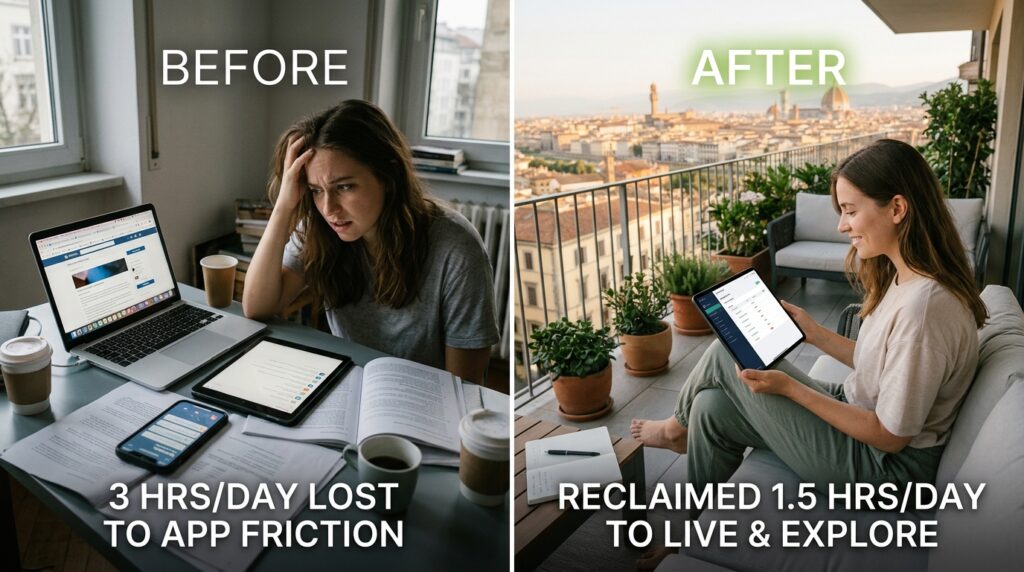
When I look back at how I used to manage my digital presence, I am horrified by how much of my life I was simply giving away to the friction of poorly designed native apps. I was spending three hours a day jumping between tabs, swiping through notifications, and getting lost in algorithmic rabbit holes.
This management app didn’t just organize my workflow; it literally bought me back an hour and a half of my life every single day.
That is an hour and a half I can now spend writing, exploring my beautiful city, or simply sitting on my balcony without feeling the phantom vibration of a missed notification in my pocket.
Final Thoughts on Digital Architecture
We spend so much time curating the aesthetic of our physical workspaces. We buy ergonomic chairs, we position our monitors at the right height, and we buy nice desk lamps because we know that our environment dictates our focus.
Yet, we rarely apply that same level of intention to our digital workspaces.
We allow our phones to become chaotic, stressful minefields of unorganized data and demanding notifications.
If you are a freelancer, a small business owner, or simply someone trying to build a personal brand online, you have to treat your digital architecture with respect. You cannot build a professional empire using amateur tools.
Stop trying to spin the plates natively. Stop waking up in a cold sweat wondering if you posted the right caption to the right account.
Invest in a robust, centralized social media management app. Let the software handle the scheduling, the data aggregation, and the inbox sorting. Build a digital wall between your work and your scrolling.
It might cost a modest monthly subscription fee, but the peace of mind, the regained hours, and the sudden quiet in your brain are worth infinitely more than what you will pay. I haven’t had the nightmare about the dog meme in over two years, and for that alone, this app will never leave my home screen.
