
There is an incredible, almost hilarious paradox at the heart of modern wellness: we are using the exact device that destroyed our attention spans to try and fix them.
My smartphone is a slot machine of stress. It holds my work emails, my chaotic family group chats, breaking news alerts, and endless social media feeds designed specifically to hijack my dopamine receptors. Yet, when my brain feels completely fried at 2:00 PM and I cannot focus on the spreadsheet in front of me, what do I do? I pick up that exact same device, open a meditation app, and hope that a soothing voice will somehow cure my digital burnout.
For the first few years of using mindfulness applications, I barely scratched the surface of what they could do. I would open the app, tap the “Daily 10-Minute Meditation” button, sit quietly, and then immediately return to the chaos of my inbox. It felt like putting a tiny, temporary band-aid on a massive, gaping wound of distraction.
I assumed these apps were just digital libraries of guided breathing exercises. I thought their only purpose was to help me relax.
But as I began digging deeper into the software, moving past the home screens and exploring the hidden tabs, I realized I had completely misunderstood the technology. The developers of platforms like Calm, Headspace, Insight Timer, and Waking Up have quietly built highly sophisticated productivity engines into their software. They aren’t just trying to help you sleep; they are trying to help you work.
If you are struggling to maintain your concentration during long workdays, the cure might already be installed on your phone. Here are the hidden features in meditation apps that will radically improve your focus, and how you can start using them today.
1. The Dedicated “Focus” Music Hubs
When we think of meditation apps, we usually think of a soft-spoken narrator telling us to notice the feeling of our feet on the floor. While that is great for anxiety, a guided voice is actually terrible for deep, analytical work. You cannot write an essay or code a website while someone is actively talking in your ear.
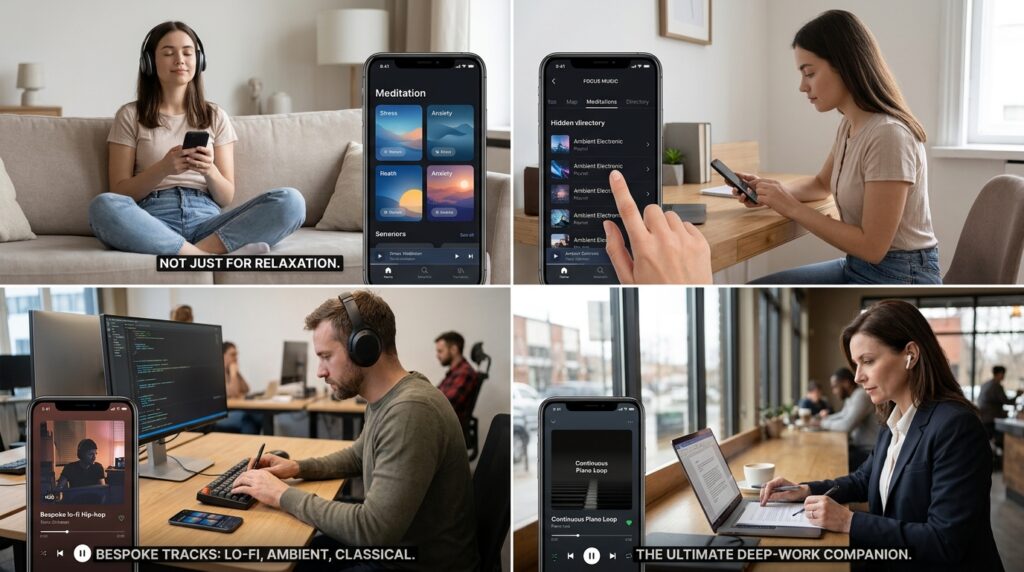
However, apps like Headspace and Calm have completely hidden “Focus” directories that contain zero talking.
If you navigate away from the main meditation tab in Headspace, you will find an entire section dedicated exclusively to productivity music. I’m not just talking about generic elevator music. These apps partner with world-class musicians (like John Legend and Hans Zimmer) to create bespoke, continuous loop tracks designed specifically to enhance concentration.
They offer lo-fi hip-hop beats, ambient electronic soundscapes, and classical piano loops. Because these tracks are hosted inside your meditation app, there are no jarring Spotify advertisements, no sudden algorithm shifts that start playing a heavy metal song, and no lyrics to distract your language-processing centers. Discovering this feature completely transformed how I handle my afternoon workload, a shift I explored heavily in Apps That Help Me Focus When Working From My Phone. It turns a relaxation app into the ultimate deep-work companion.
2. Binaural Beats and Brainwave Entrainment
If you want to take background noise a step further, you need to search for a hidden, highly scientific audio category called “Binaural Beats.”
This feature is prominently buried in the search filters of apps like Insight Timer. Binaural beats are a form of soundwave therapy. When you wear stereo headphones, the app plays a slightly different audio frequency into your left ear than it does into your right ear.
Your brain registers the difference between these two frequencies and attempts to reconcile them, creating a third, phantom frequency inside your head. This process is called “brainwave entrainment.”
If you select a track labeled “Beta” or “Gamma” frequencies (usually around 15 to 40 Hz), you are actively tricking your brain into entering a state of high alertness, problem-solving, and intense concentration. It sounds like science fiction, but it is a deeply effective biological hack. When I have a deadline approaching and my mind is completely scattered, I don’t drink another cup of coffee. I put on my noise-canceling headphones, search my meditation app for a 40Hz binaural beat, and let the software literally tune my brainwaves into a state of focus.
3. The 60-Second “SOS” Reset
We have all experienced the terrifying “snowball effect” of losing our focus. You get a frustrating email, which breaks your concentration. You open a new tab to distract yourself from the frustration. You end up reading the news for twenty minutes. Suddenly, an hour is gone, your heart rate is elevated, and your productivity is destroyed.
When you are in the middle of a stressful workday spiral, you do not have thirty minutes to sit in the lotus position and find enlightenment. You need a fast, aggressive pattern interrupt.
Almost all major mindfulness apps have a hidden “SOS” or “Panic” section.
These are ultra-short, highly targeted exercises that last exactly one, two, or three minutes. They are not designed for deep meditation; they are designed for immediate nervous system regulation. They usually involve “box breathing” (inhaling for four seconds, holding for four, exhaling for four, holding for four) or rapid body scans.
When I catch myself losing focus and slipping into a distracted spiral, I pull up a two-minute SOS breathing exercise. It acts like a digital circuit breaker. It forces my heart rate to drop, clears the cortisol from my bloodstream, and allows me to return to my task with a completely blank slate. You don’t need a long session to reclaim your day; you just need sixty seconds of intentionality.
4. Interval Bells for Self-Guided Sustained Attention
The ultimate goal of using a meditation app is to eventually not need the app at all. Guided meditations are fantastic training wheels, but relying entirely on a soothing voice to keep you focused limits your actual attention span.
To build superhuman focus, you have to transition to unguided practice. But staring at a silent wall for twenty minutes is incredibly intimidating.
The secret bridge between guided and unguided practice is the Interval Bell feature.
In apps like Insight Timer, there is a hidden “Timer” tab. Instead of playing a guided track, you set a silent timer for twenty minutes. However, you can program the app to strike a soft, resonant Tibetan singing bowl every three or five minutes during that silence.
This is the ultimate focus-training tool. When you are sitting in silence, your mind will inevitably wander. You will start thinking about your grocery list or your upcoming meeting. But right when you get completely lost in thought, the soft ding of the interval bell chimes. It serves as a gentle, non-judgmental reminder to bring your attention back to your breath.
This practice is essentially weightlifting for your attention span. Every time the bell rings and you pull your focus back, you are strengthening the neural pathways required for deep concentration. This was the exact feature that cemented my daily habit, a realization I shared when writing The Meditation App I Didn’t Expect to Love So Much. It teaches you how to sustain your own attention without someone holding your hand.
5. Escaping the Screen with Wearable Integrations
As I mentioned earlier, the biggest danger of using a smartphone to find focus is the smartphone itself.
If you unlock your phone to open your mindfulness app, you have to navigate past the red notification bubbles on your email, text messages, and social media icons. It requires a massive amount of willpower to ignore those notifications and actually open the meditation tool.
The best hidden feature of these apps is their ability to bypass the phone screen entirely through smartwatch integrations.
If you own an Apple Watch, a Garmin, or a Google Pixel Watch, you can install the lightweight companion version of your meditation app directly onto your wrist.
When I am at my desk and I need a five-minute mental reset to regain my focus, I do not touch my phone. My phone stays face down, completely out of sight. I just tap my wrist, hit start, and close my eyes. The watch uses haptic feedback—tapping my wrist in a rhythmic pattern—to guide my inhale and exhale.
I get all the neurobiological benefits of the focus exercise without ever exposing my eyes to the chaotic, distracting environment of my smartphone’s home screen.
6. The “Mindful Minutes” Data Sync
You cannot improve what you do not measure.
If you want to understand why your focus is terrible on certain days, you have to look at the data. Most people treat their meditation practice in isolation, completely separate from their sleep data, their exercise, and their screen time.
You need to go into the settings of your meditation app and explicitly authorize it to sync with your phone’s central health ecosystem (Apple Health or Google Fit).
When you toggle this hidden setting, the app starts logging “Mindful Minutes” into your master health dashboard.
Once I did this, I started noticing incredible correlations. My health dashboard showed me that on days where I logged at least ten mindful minutes in the morning, my overall screen time dropped by almost 20%, and my deep sleep increased. On days where I skipped the app, my focus metrics plummeted.
By tying the app’s data into your broader biological tracking, you stop viewing meditation as a woo-woo spiritual practice, and you start viewing it as a hard, scientific input that directly dictates your cognitive output.
7. Preparing Tomorrow’s Focus with Sleep Stories
Finally, we have to acknowledge a hard biological truth: you cannot hack your way out of a bad night of sleep.
No amount of binaural beats, lo-fi music, or breathing exercises will give you laser-like focus on a Tuesday afternoon if you only slept for four hours on Monday night. Focus does not start when you sit down at your desk; focus starts the night before.
The most powerful hidden focus features in these apps are actually tucked away in their “Sleep” directories.
When we are stressed, our brains refuse to shut down. We lay in bed ruminating about the workday, projecting anxiety into the future. This destroys our sleep architecture.
Apps like Calm and Headspace have pioneered the “Sleep Story” feature. These are forty-five-minute, incredibly mundane stories narrated by people with famously soothing voices (like Matthew McConaughey or Cillian Murphy). They are essentially bedtime stories for adults.
They are designed to be just interesting enough to hold your attention—preventing you from ruminating on your own anxieties—but boring enough that you fall asleep halfway through. Learning how to properly wind down my nervous system completely revolutionized my mornings, an experience I documented in 6 Meditation Apps That Helped Me Relax After Stressful Days. When you use the app to protect your sleep, you wake up with a fully recharged prefrontal cortex, completely ready to tackle the day.

Final Thoughts: Sharpening the Blade
There is a famous story about a woodcutter who is furiously chopping away at a tree with a dull axe. He is sweating, exhausted, and making terrible progress. A passerby suggests he take a five-minute break to sharpen his axe. The woodcutter angrily replies, “I don’t have time to sharpen the axe, I have a tree to cut down!”
When we are overwhelmed with work, our instinct is to just put our heads down, grit our teeth, and try to force ourselves to focus. We view taking a break as a waste of precious time.
But trying to focus with a scattered, distracted brain is exactly like trying to cut down a tree with a dull axe.
The meditation apps on your phone are not just relaxation tools; they are whetstones for your mind. They are packed with sophisticated, science-backed features—from binaural frequencies to haptic breathing integrations—designed specifically to sharpen your cognitive abilities.
Take fifteen minutes today to dig past the guided basics. Explore the focus music hubs, set up a self-guided interval bell, and authorize the health data syncing. When you finally unlock the true architecture of these applications, they stop being a passive chore on your to-do list, and they become the most powerful productivity levers you own.
