
There was a phase in my life where I spent significantly more time organizing my work than actually doing it.
I call it the “Productivity Trap,” and it is an incredibly easy cycle to fall into. A few years ago, my digital ecosystem was a sprawling, overly complicated mess. I was convinced that if I just downloaded one more app, set up one more database, or color-coded one more spreadsheet, I would finally unlock the secret to ultimate human efficiency.
At my absolute worst, I had a dozen different tools running simultaneously. I used one app to track my daily habits, another for my grocery lists, a massive, clunky database for my long-term projects, a digital notebook for random ideas, a native calendar app for my meetings, and a specialized Pomodoro timer to force myself to focus.
The ironic result? I was constantly exhausted.
My phone was constantly buzzing with notifications from different platforms. When I had a brilliant idea while walking down the street, I would freeze, paralyzed by the decision of where exactly I was supposed to save it. By the time I opened the “correct” app, the idea had vanished. I felt like I was managing a chaotic digital hotel where the guests were constantly switching rooms, and I was the bewildered concierge trying to keep track of it all.
I hit my breaking point on a particularly stressful Wednesday afternoon. I missed a crucial deadline for a client because the task was buried in an app I had forgotten to check. I realized that my productivity system wasn’t supporting my life; it was actively sabotaging it.
I decided to burn the entire system to the ground. I deleted almost everything off my phone and went back to the absolute basics. I realized that, at its core, getting things done only requires answering two fundamental questions: What do I need to do? And when am I going to do it?
I forced myself to downsize my entire life into exactly two applications. This shift was profound, a realization I initially hinted at when I wrote about (How I Created a Productivity System That Actually Sticks). If you are currently drowning in software, feeling overwhelmed by your own to-do lists, and craving a return to sanity, let me show you exactly how I organize my entire existence using just two apps.
The Philosophy: The Brain vs. The Clock
Before we talk about the specific software, we have to talk about the underlying philosophy.
Your brain is a spectacular tool for generating ideas, solving complex problems, and being creative. However, it is an absolutely terrible storage device. When you try to use your brain to remember that you need to buy almond milk, email your boss, and pay the electric bill, you create a constant, low-grade hum of anxiety in the background of your consciousness. You are essentially using up all your mental RAM on administrative tasks.
To solve this, you need an “External Brain.” This is a place where tasks go to live so your actual brain doesn’t have to hold onto them.
But an external brain is only half the puzzle. A list of tasks has no concept of time. You can put fifty items on a to-do list, but you cannot bend the laws of physics to complete them all in an eight-hour workday.
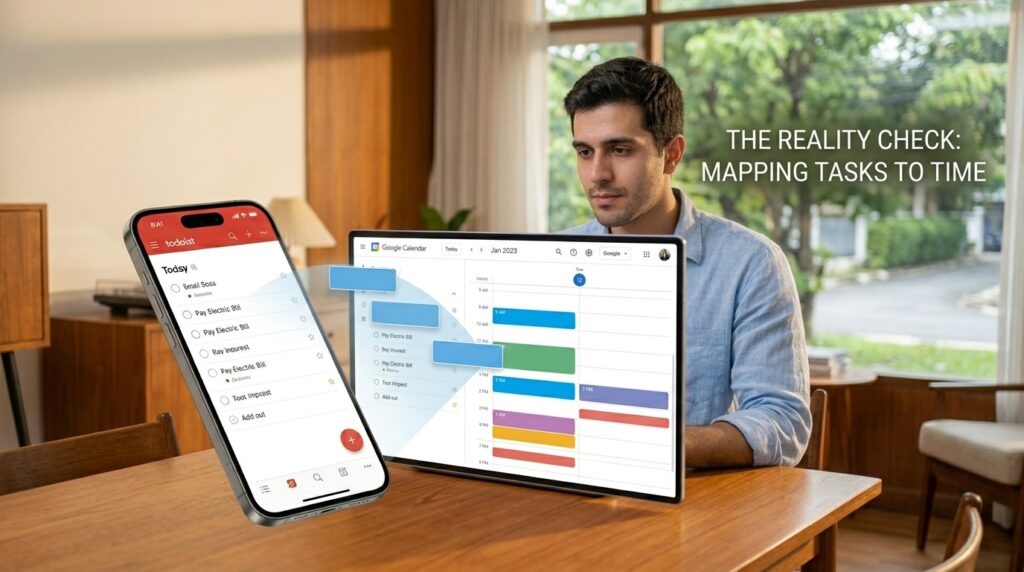
Therefore, you also need a “Reality Check.” You need a tool that forces you to map those tasks onto the actual, finite hours of your day.
For the External Brain, I chose Todoist. For the Reality Check, I chose Google Calendar.
Together, they form an unbreakable, utterly simple closed-loop system. Here is exactly how they work together to run my day.
App 1: Todoist (The External Brain)
The first rule of my two-app system is ruthless capture. If a thought crosses my mind, it must immediately be externalized.
I use Todoist because it is the fastest, most frictionless task manager on the market. Its superpower is its natural language processing. I don’t have to click through clunky menus to set a date or a priority.
If I am sitting at a cafe in Rio, drinking an espresso, and I suddenly remember that I need to renew my passport, I don’t panic. I pull out my phone, open Todoist, and type: “Renew passport next Friday at 10am p1.”
I hit enter, and the app instantly does the heavy lifting. It recognizes “next Friday at 10am” and schedules it. It recognizes “p1” and flags it as a priority one task. In less than five seconds, the thought is out of my head and safely stored in my digital system. I can go back to enjoying my coffee, knowing with absolute certainty that the app will remind me when the time comes.
I use Todoist to hold absolutely everything. It holds my grocery lists, my long-term career goals, my daily chores, and the books I want to read. I have it installed on my phone, my laptop, and as a browser extension. It is the ultimate catching net for my life. If a task isn’t in Todoist, it simply doesn’t exist.
This level of centralized trust completely eradicated my anxiety about forgetting things. It became the bedrock of my focus, a concept I explored deeply when dissecting (The Productivity App That Changed How I Work Every Day). When your mind is empty of clutter, it is finally free to do deep, meaningful work.
App 2: Google Calendar (The Reality Check)
While Todoist is incredible for capturing tasks, a list alone is dangerous. A to-do list is aspirational; it is a wish list of things you hope to accomplish.
To turn those wishes into reality, you have to introduce them to the harsh constraints of time. This is where Google Calendar comes in.
I practice a method called “Time Blocking.” I do not work from a traditional to-do list. Instead, my calendar dictates my entire day.
If a task in Todoist is going to take more than fifteen minutes to complete, it must be dragged onto my Google Calendar as a physical block of time. If I need to write a project proposal, I don’t just leave it on a list and hope I find time for it. I create a calendar event from 9:00 AM to 11:00 AM called “Write Proposal.”
This forces me to be brutally honest with myself about my capacity. When I look at my calendar, I can visually see the finite boxes of time. If a friend asks if I can take on a freelance project this week, I don’t guess. I look at my calendar. If there is no white space left, the answer is no. I cannot manufacture a 25th hour in the day.
Google Calendar is the boss. Whatever the calendar says at 10:00 AM is exactly what I am doing at 10:00 AM. This entirely eliminates decision fatigue. I don’t wake up, stare at a massive list of tasks, and waste thirty minutes trying to decide what to do first. The decision was already made during the planning phase. I just wake up, look at the block, and execute.
The Magic of Integration: The Two-Way Sync
Now, you might be thinking, “Having to type tasks into Todoist and then manually type them again into Google Calendar sounds like double the work.”
You would be absolutely right. That is why the true magic of this two-app system relies on their native integration.
Todoist and Google Calendar have a powerful, built-in two-way sync. When I connect the two apps, they talk to each other in real-time.
If I add a task in Todoist and assign it a specific time (e.g., “Client Call at 3pm”), that task instantly appears on my Google Calendar as a 3:00 PM block.
Conversely, if my day suddenly gets chaotic, and I need to push that client call back an hour, I can simply click and drag the block on my Google Calendar from 3:00 PM to 4:00 PM. The moment I drop the block, the time automatically updates back inside Todoist.
They act as a single, unified organism. Todoist handles the capture and categorization, and Google Calendar handles the spatial visualization of my day.

The Daily Workflow in Practice
To give you a concrete idea of how this actually plays out, here is exactly what my daily workflow looks like using just these two tools.
The Night Before: I never plan my day on the morning of. Mornings are for execution, not planning. At 6:00 PM, when I am wrapping up my workday, I open Todoist. I look at everything I completed and everything I missed. I then open Google Calendar side-by-side.
I look at tomorrow’s blank spaces. I take the highest priority tasks from Todoist and block them into tomorrow’s calendar. I schedule my workout, my deep work blocks, my admin time, and even my lunch. By 6:15 PM, tomorrow is entirely planned. I close my laptop and enjoy my evening in peace.
The Morning: When I wake up, I do not look at social media or my email. I look at my Google Calendar widget. It tells me exactly what my first move is. Usually, it is a block dedicated to exercise, followed by a block for writing. I simply follow the blue boxes.
Throughout the Day: As the day unfolds, new inputs constantly arrive. My boss emails me a new request. A friend texts me about dinner next week. I suddenly realize we are out of dog food.
I do not let these inputs derail my current calendar block. I simply open Todoist, type the thought into my “Inbox” folder, and immediately return to my focused work. The capturing process takes three seconds. The task is safe, and my focus remains unbroken.
The Sunday Weekly Review
A system is only as good as its maintenance. If you don’t regularly clean out your digital tools, they will eventually become just as cluttered as the physical junk drawer in your kitchen.
Every Sunday morning, I sit down with a cup of coffee and perform a Weekly Review. This is a non-negotiable ritual that keeps the entire two-app ecosystem functioning smoothly. If you struggle with the Sunday scaries, building a structured review process is the best cure, a strategy I broke down step-by-step in my guide to (Tools That Help Me Plan My Week Without Stress).
During this review, I open my Todoist “Inbox.” This is where all those random thoughts, grocery items, and sudden requests from the past week have accumulated. I process them one by one.
Does this task take less than two minutes? I do it right now. Is it a bigger project? I assign it a date and a priority level. Is it something I actually don’t need to do at all? I delete it without guilt.
Once the Inbox is at zero, I look at the week ahead on my Google Calendar. I map out the major, immovable boulders first: the important meetings, the deadlines, the social events. Then, I fill in the remaining gaps with the medium-sized rocks from Todoist.
I am essentially paving the road on Sunday so that I can just drive smoothly from Monday to Friday.
Dealing with the Unexpected
The most common criticism of time-blocking and strict daily planning is that it is too rigid. People tell me, “My job is too unpredictable! I can’t block my time because emergencies always pop up.”
This is a fundamental misunderstanding of the system. A calendar is not a prison; it is a flexible map.
If it is 2:00 PM, and I am in the middle of a focused writing block, but an absolute, undeniable emergency happens at work, my system does not break. I simply deal with the emergency.
But because I have my day mapped out visually on Google Calendar, I can immediately see the consequences of that emergency. If I spend the next two hours putting out a fire, I can see that my “Write Proposal” block got run over.
Instead of letting that task vanish into the void, I simply click the “Write Proposal” block on my calendar and drag it to a white space on Thursday afternoon. The crisis is handled, the original task is safely rescheduled, and the system remains intact. The visual nature of the calendar allows you to pivot and adapt to chaos with total grace.
Final Thoughts: The Ultimate Luxury of Simplicity
We live in a culture that worships complexity. We are constantly sold the lie that if we just buy a more complicated tool, a more advanced planner, or a more expensive subscription, we will suddenly become hyper-productive superhumans.
It is a trap. Complexity breeds friction, and friction kills consistency.
When you strip away all the bells and whistles, productivity is incredibly boring. It is just the act of deciding what matters most, setting aside the time to do it, and ignoring everything else until it is done.
You do not need fifteen apps to manage your life. You do not need a digital ecosystem that requires a computer science degree to navigate.
You need a place to catch your thoughts before they slip away, and you need a visual map of the hours you have left in the day. That is it.
Take a hard look at your smartphone today. Look at all the productivity apps, the habit trackers, the note-taking tools, and the digital planners that you haven’t opened in months. Delete them. Give yourself the profound luxury of simplicity. Master your external brain, surrender to the reality of your calendar, and watch as your days transform from a chaotic scramble into a beautifully orchestrated routine.
